Viewing Evaluation Results
Overview
Once your evaluation completes, Agenta provides comprehensive views to analyze the results and understand your LLM application's performance.
Overview evaluation tab
The main view offers an aggregated summary of results.
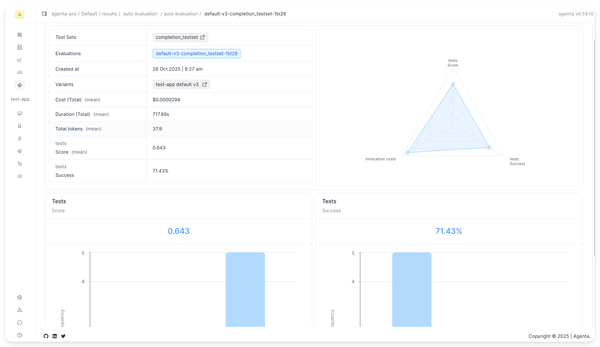
- Average score per evaluator for each variant/test set combination
- Average latency
- Total cost
- Creation date
Test cases evaluation tab
The test cases evaluation tab provides a detailed view of each test case.
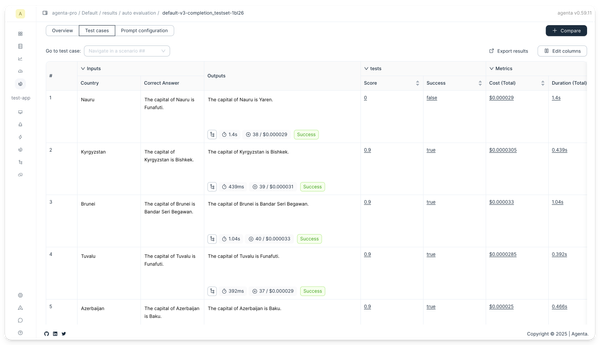
The evaluation table columns show:
- Inputs: The input data from your test set
- Reference Answers: The expected/correct answers used by evaluators
- LLM Output: The actual output from your application
- Evaluator Results: Scores or boolean values from each evaluator
- Cost: The cost of running this test case
- Latency: How long the test case took to execute
If you click on a test case, you will see a drawer with the full output and the evaluator results.

Prompt configuration tab
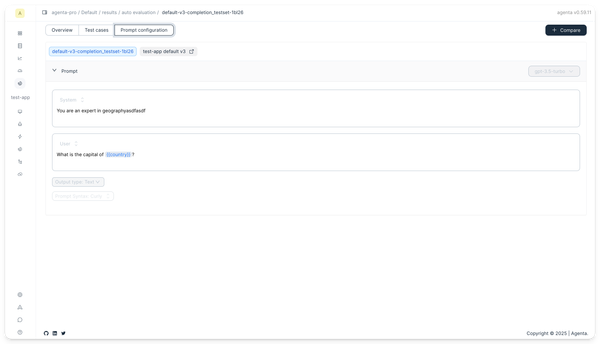
The prompt configuration tab shows the prompt configuration used for this evaluation.
Exporting results
Export your evaluation results for further analysis:
- Click the Export button on the evaluation detail page
- Choose CSV format
- Open in your preferred analysis tool (Excel, Python, R, etc.)
Next steps
- Learn how to compare multiple evaluations
- Try human evaluation for qualitative assessment
- Explore evaluation concepts to understand evaluation approaches