Compare Grok Bot alternatives for one-off tasks, persistent AI coworkers, team work, personal assistance, model choice, and self-hosting.
Grok Bot is a system for creating named AI teammates that keep working after you step away. Each Bot has memory, tools, files, routines, and access to a persistent cloud computer. Bots can work across websites and applications, coordinate with one another, and learn how you prefer a job to be done.
Grok Bot is xAI’s persistent-agent product. It is separate from the Grok chatbot and Grok’s image-generation features.
That makes Grok Bot different from an ordinary chat with ChatGPT or Claude. A chat helps with the request in front of you. Grok Bot is organized around persistent agents that can take responsibility for ongoing work.
You may still want an alternative. Some products are better for one polished task. Some focus on research or visual automation. Personal assistants give technical users more control over their own devices. Team coworker platforms add visible configuration, permissions, versioning, cost controls, model choice, and self-hosting.
Key takeaways
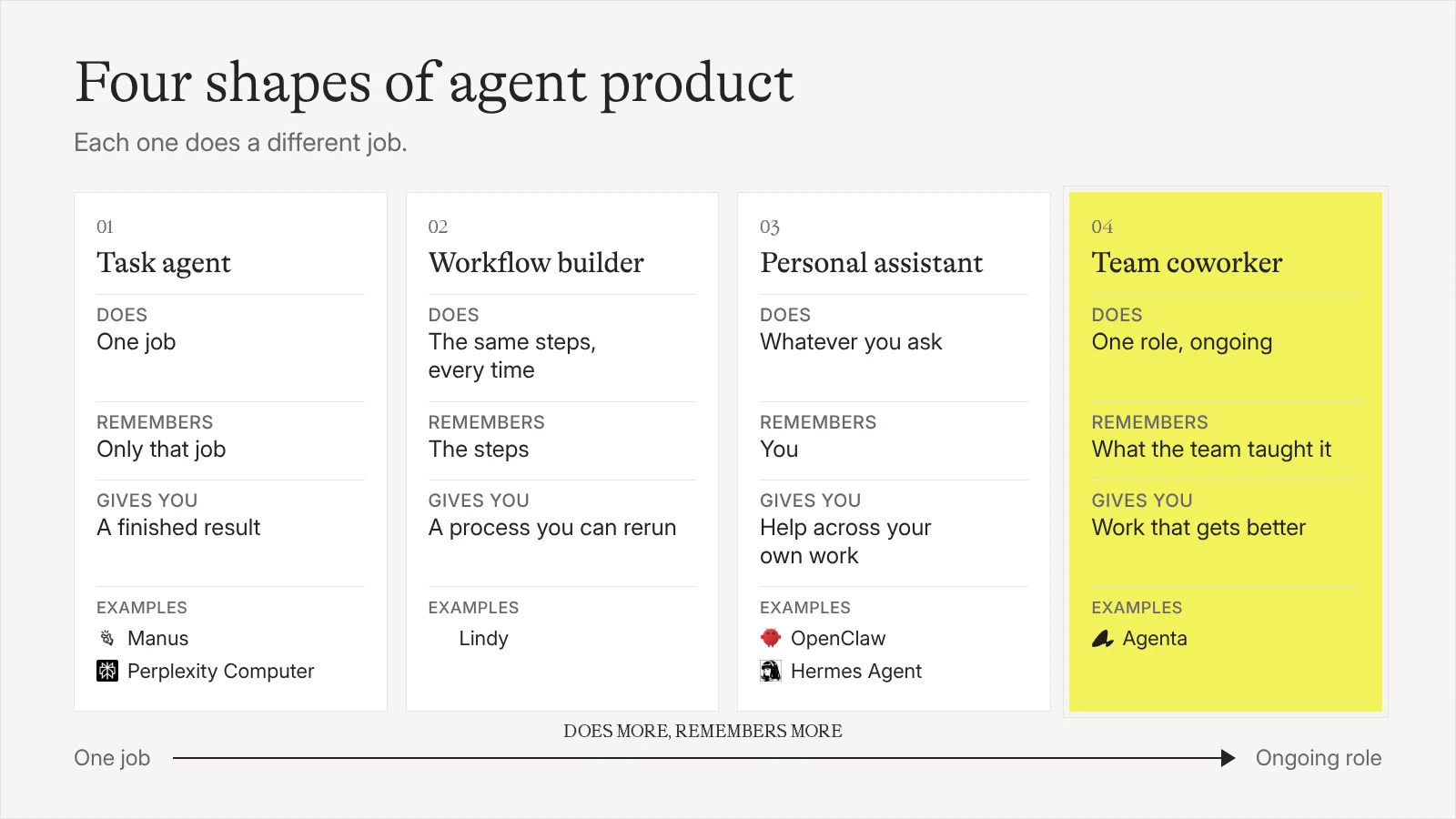
- Choose a task agent when you want one finished deliverable, a workflow builder when the steps are known, and an AI coworker when the responsibility continues over time.
- Grok Bot remains one of the simplest ways to create several persistent agents that share a managed computer and learn routines through use.
- Choose an alternative when you need stronger team governance, your own deployment, or more control over models, payment, and configuration.
The best Grok Bot alternatives at a glance
| Alternative | Best for | Product type | Model choice | Starting price |
|---|---|---|---|---|
| Agenta | Configurable AI coworkers for professional teams | Coworker workspace | Your API keys, supported subscriptions, and supported models | Free and open source for self-hosting |
| OpenClaw | A technical, self-hosted personal assistant | Personal agent | Hosted, subscription-backed, gateway, or local models | Free and open source; model and hosting costs apply |
| Manus | Research, slides, websites, and finished deliverables | General task agent | Managed by Manus | Free plan; paid Pro and Team plans |
| ChatGPT Work | General multi-step work in the OpenAI ecosystem | Task agent | OpenAI models | Included with eligible paid ChatGPT plans |
| Claude Cowork | File-heavy and connected knowledge work | Task agent | Anthropic models | Included with paid Claude plans; Pro is $20 monthly |
| Perplexity Computer | Research that benefits from citations and several models | Research agent | Several models selected within Perplexity | Available through paid Perplexity access and usage credits |
| Lindy | Ready-made business assistance and visual workflows | Assistant and workflow builder | Selection among major models | Plus starts at $29.99 per user monthly |
| Hermes Agent | A deeply customizable personal agent | Personal agent | Your API keys and configured providers | Free and open source; model costs apply |
What makes Grok Bot different
Grok Bot is built around persistent AI coworkers rather than a list of disposable chats. A Bot has a name, job, memory, tools, files, and working context. You can give separate Bots responsibility for sales outreach, expenses, recruiting, product work, or operations, then let them coordinate in shared threads.
Each Bot has a screen on one persistent cloud computer scoped to your account. All Bots in the account share the computer’s files, browser sessions, and application logins. This makes handoffs easy because one Bot can continue from another Bot’s work without repeating setup. It also means the Bots do not have separate computer-level security boundaries.
Grok Bot can learn a workflow by watching you perform it. It saves the process as a routine, applies corrections, and can repeat the work later or on a schedule. This moves it beyond a task agent that starts from a fresh request each time.
What Grok Bot does especially well
The appeal is simplicity. You create a Bot, explain its job, grant access when needed, and work with it through conversation. The platform hides much of the underlying configuration so that delegating feels closer to messaging a colleague than operating an automation system.
Its shared cloud computer also makes coordination unusually direct. One Bot can continue from files, browser sessions, and application state created by another. If you want a managed roster of agents and do not want to design their infrastructure, this is Grok Bot’s strongest advantage.
Why consider a Grok Bot alternative?
The main reasons depend on what you want to control.
- You need a different product shape. A polished task agent or deterministic workflow may fit better than a team of persistent Bots.
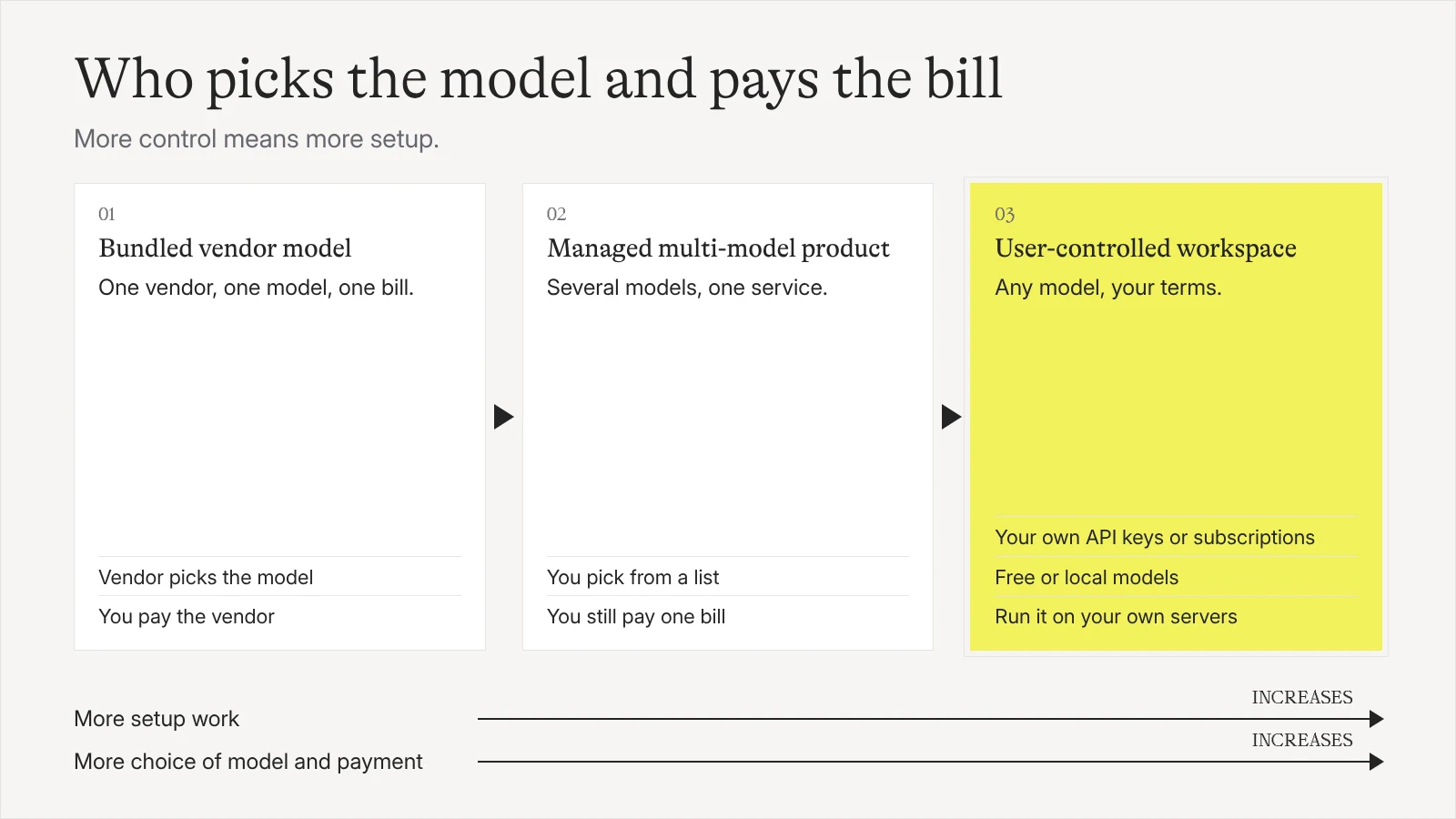
- You want model freedom. Grok Bot uses the models and usage system provided by xAI. Other platforms let you bring an API key, use an existing AI subscription, or route different jobs to different models.
- You need team governance. Professional use may require permissions, visible configuration, version history, per-agent budgets, auditability, and clearer separation between coworkers.
- You want ownership and portability. Open-source and self-hostable products let you control the deployment and inspect more of the system. Readable agent configuration can also make skills and instructions easier to version and move.
- You want a different cost model. Managed plans and credits are simple, but they may be expensive for frequent work. Using your own subscription, infrastructure, or lower-cost model can make routine jobs more predictable.
How to choose a Grok Bot alternative
Use these questions to narrow the list.
Do you need a task, a workflow, or a coworker?
A task agent takes a goal and returns a result. Manus, ChatGPT Work, and Claude Cowork are strong for research, files, presentations, websites, and other finished deliverables.
A workflow system runs a process whose steps are mostly known in advance. Lindy is useful when you want templates, triggers, integrations, and approvals in a visual editor.
An AI coworker owns an ongoing responsibility. It keeps context, uses tools, runs recurring work, learns preferences, and improves through feedback. Grok Bot, Agenta, and Hermes place this relationship closer to the center of the product.
What can it access?
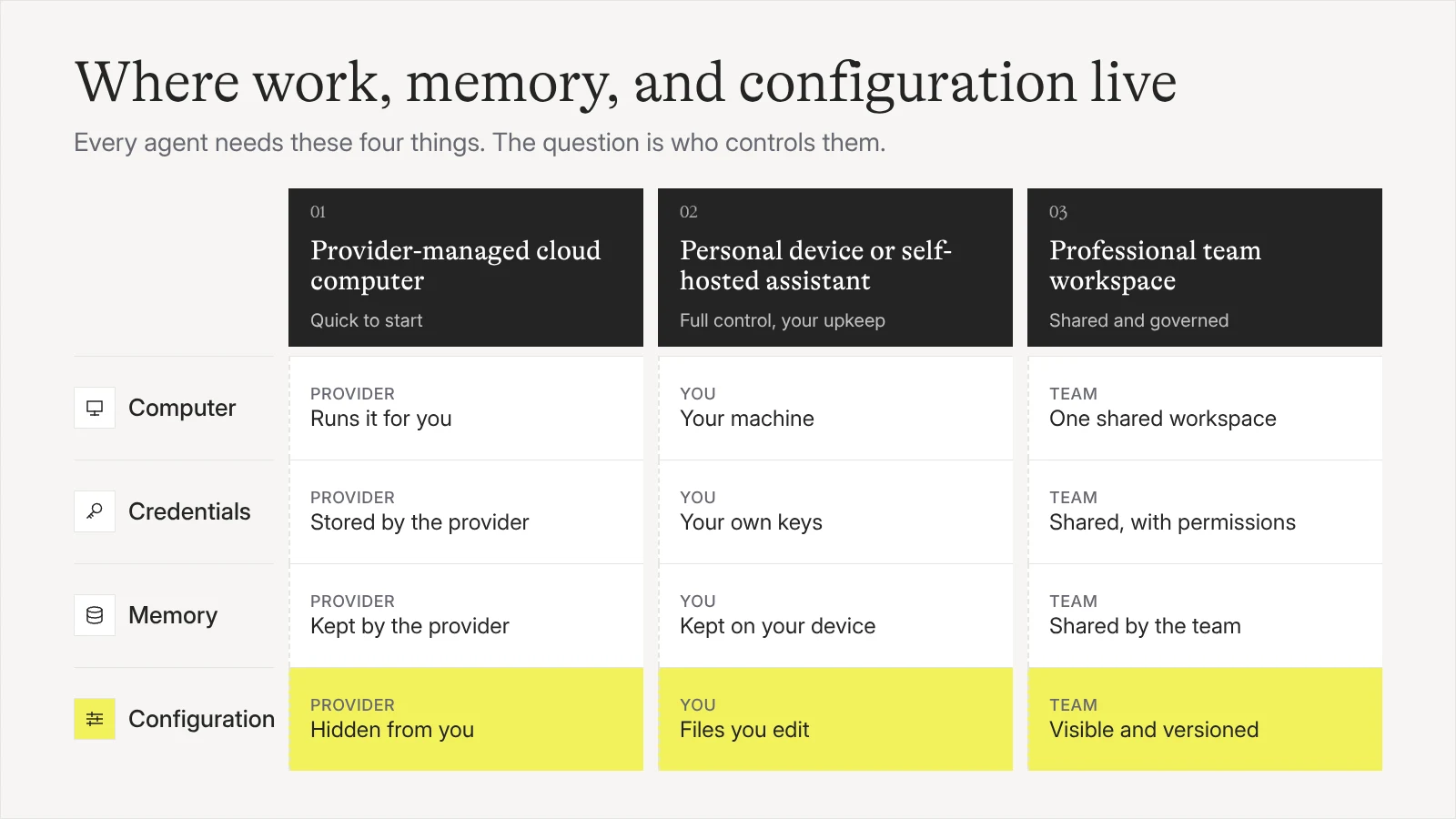
Check whether the agent has a browser, terminal, files, a sandbox, application integrations, and access to the computer where the work happens. Then check where that environment runs and how credentials are controlled.
A full computer helps when the agent must use websites with no clean application programming interface. Direct integrations are often more reliable for structured business work. The strongest option depends on the systems your job touches.
Is it for one person or a team?
Personal agents optimize for one person’s devices, accounts, channels, and preferences. Team products need shared access, permissions, separate responsibilities, visible configuration, versioning, cost controls, and a way for several people to improve the system safely.
Can you choose the model and payment method?
Some products tie the agent to one vendor’s models. Others choose several models behind the scenes. Open systems may let you bring an API key, connect a supported AI subscription, or use a free or inexpensive model for routine work.
This matters for cost and fit. A strong model may be worth using for strategy or difficult research, while a cheaper model may be enough for classification, extraction, or recurring summaries.
How much configuration do you want?
A fixed product is easier to start. A code-first system offers deep control but asks you to operate more of the stack. The middle ground lets a non-engineer work with the agent through conversation while an engineer can inspect and change its instructions, tools, permissions, and runtime.
Agenta: best for configurable AI coworkers for teams
Agenta is an open-source workspace for building AI coworkers and automations for professional work. Instead of giving one general assistant every request, you can create several coworkers with distinct jobs. A research coworker, search engine optimization coworker, outreach coworker, and customer-support coworker can each keep the context and tools needed for their responsibility.
Each coworker can have its own instructions, skills, persistent shared agent files and temporary session files, tools, channels, permissions, and schedules. It can work interactively in a conversation, collaborate in Slack threads, run inside an embedded web chat widget (Publish > Embed) on an internal dashboard or portal, run in the background, or delegate parts of a job to other agents. Feedback can update the coworker’s configuration, and versioning lets the team keep the better behavior without losing the previous setup.
Agenta is designed to be simple without hiding all of the machinery. A business user can ask for work, give feedback, and reuse the coworker. A technical teammate can inspect the configuration, connect systems, set permissions, trace runs, review costs, and change how the coworker operates. This follows the same principle as prompt management for non-engineers: domain experts should be able to improve behavior without losing technical control.
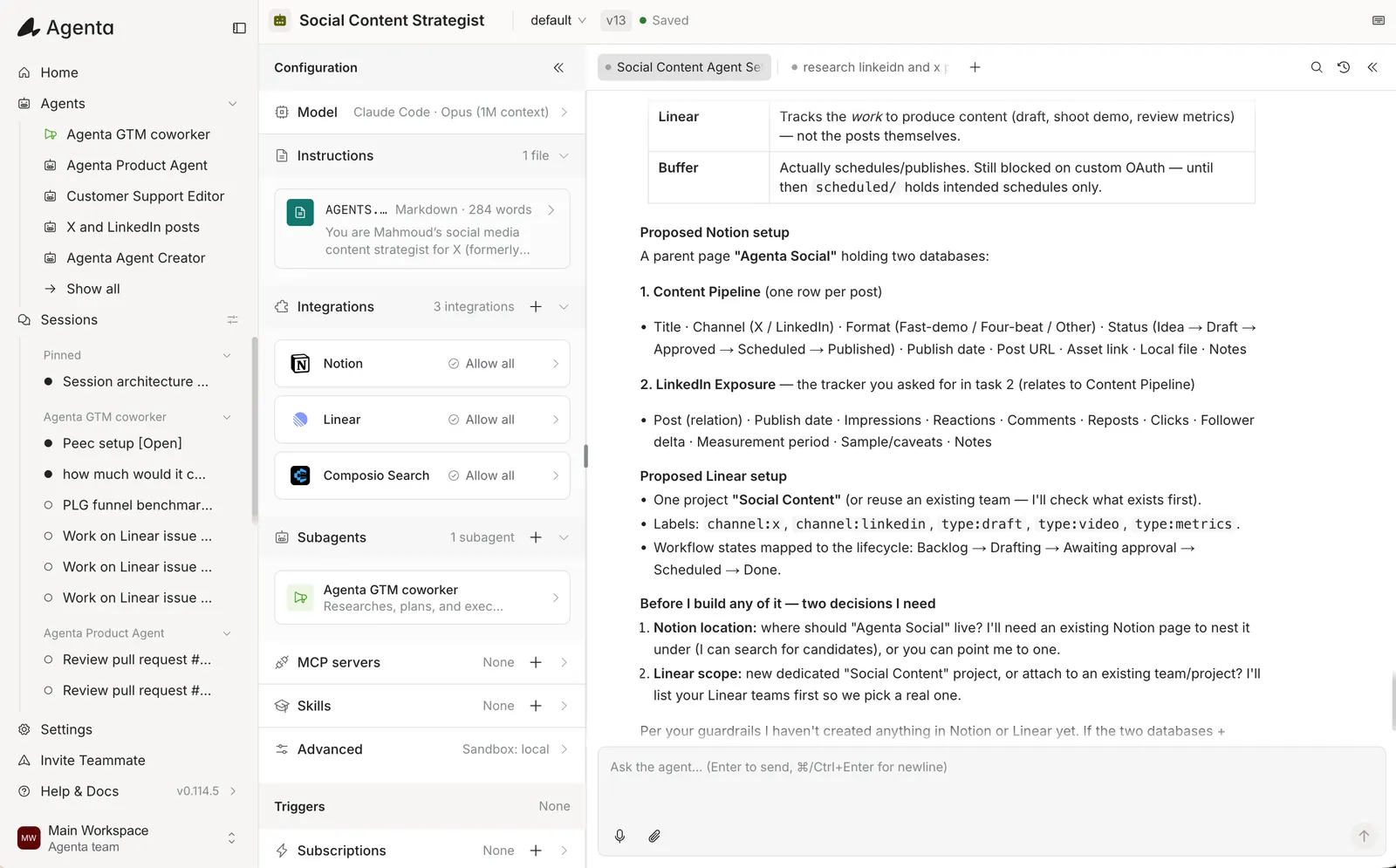
Model and payment freedom are central. When self-hosting Agenta, teams can bring their own model API keys, use supported ChatGPT or Claude subscriptions, or connect supported free and lower-cost models. That lets the team match the model to the job rather than paying the same bundled rate for every task.
Best for: Teams that want several persistent coworkers for real business responsibilities, with visible configuration and room for both non-engineers and engineers.
Pricing: Agenta is free and MIT licensed for self-hosting. Agenta Cloud offers a Free plan ($10 in included credits, up to 3 team members), Starter at $29 per month ($30 in included credits, unlimited team members), and Plus at $99 per month ($110 in included credits, unlimited team members).
Pros:
- Multiple coworkers for different business jobs with persistent shared agent files and temporary session files
- Feedback-driven improvement with visible, versioned configuration
- Team sharing, permissions, schedules, Slack and Telegram channels, embeddable web chat widgets (
Publish > Embed), and integrations - Bring-your-own-key and supported AI subscription access
- Model choice, cost visibility, tracing, and self-hosting
- Open-source platform and portable agent components
Cons:
- Requires more initial configuration than Grok Bot
- A technical teammate may still be useful for advanced integrations and deployment
- The benefits are clearest for ongoing work rather than one simple task
Verdict: Choose Agenta when your goal is to build coworkers that become part of how a team operates. It fits teams that want a conversational experience for business users and enough depth for engineers to configure, govern, and improve the system.
OpenClaw: best open-source personal assistant
OpenClaw is an open-source personal AI assistant that runs on your devices and meets you in channels such as messaging applications. It can connect to hosted models, subscription-backed access, gateways, and local models.
OpenClaw is strongest when one technical user wants a deeply personal agent with control over the machine, channels, models, and extensions. Its large community and open code make it flexible, and self-hosting keeps the operating environment under the user’s control.
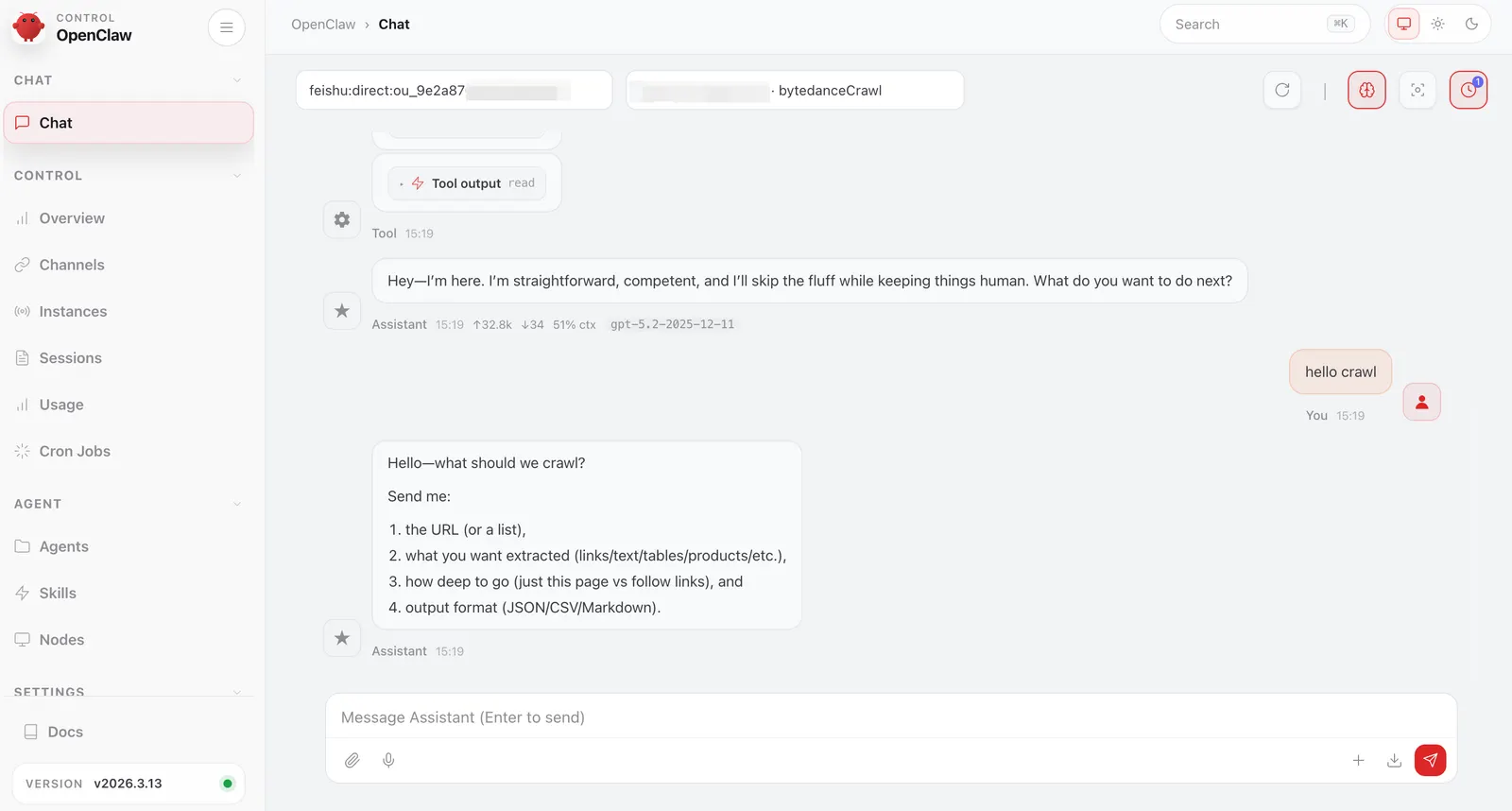
That flexibility comes with responsibility. The person running OpenClaw must understand what the agent can access, how credentials are stored, which skills are enabled, and how the environment is maintained. It is centered on a personal assistant rather than a professional workspace with team roles, shared governance, and several business users improving the same coworker.
Best for: Technical self-hosters who want a personal assistant across their own devices and communication channels.
Pricing: OpenClaw is free and open source. Model, hosting, and infrastructure costs depend on the setup.
Pros:
- Open source and self-hostable
- Broad choice of hosted, subscription-backed, and local models
- Strong personal-channel support
- Large community and extension ecosystem
- Deep control over the runtime
Cons:
- Requires technical setup and ongoing maintenance
- Security depends heavily on how the operator configures access
- Team permissions, shared governance, and business-user workflows are not the center of the product
Verdict: Choose OpenClaw when you want to operate a powerful personal assistant yourself. It is a strong fit for technical users who value control more than a ready-made team workspace.
Manus: best for polished one-off deliverables
Manus is a general AI agent for completing one-off tasks such as researching a topic, creating a presentation, analyzing files, building a website, or writing code. You describe the result and let the agent decide how to produce it. For a deeper comparison of that product category, see our guide to Manus alternatives.
Manus is useful when the work changes from request to request and the output matters more than creating a lasting organizational role. It can handle a broad range of deliverables in one managed interface without asking the user to design an agent system.
The distinction is continuity. Manus is organized around one general agent completing tasks. It does not center a roster of specialized coworkers that maintain separate jobs, learn through editable configuration, and become a shared operating system for a team. The product also controls the available models and uses its own plan and credit structure.
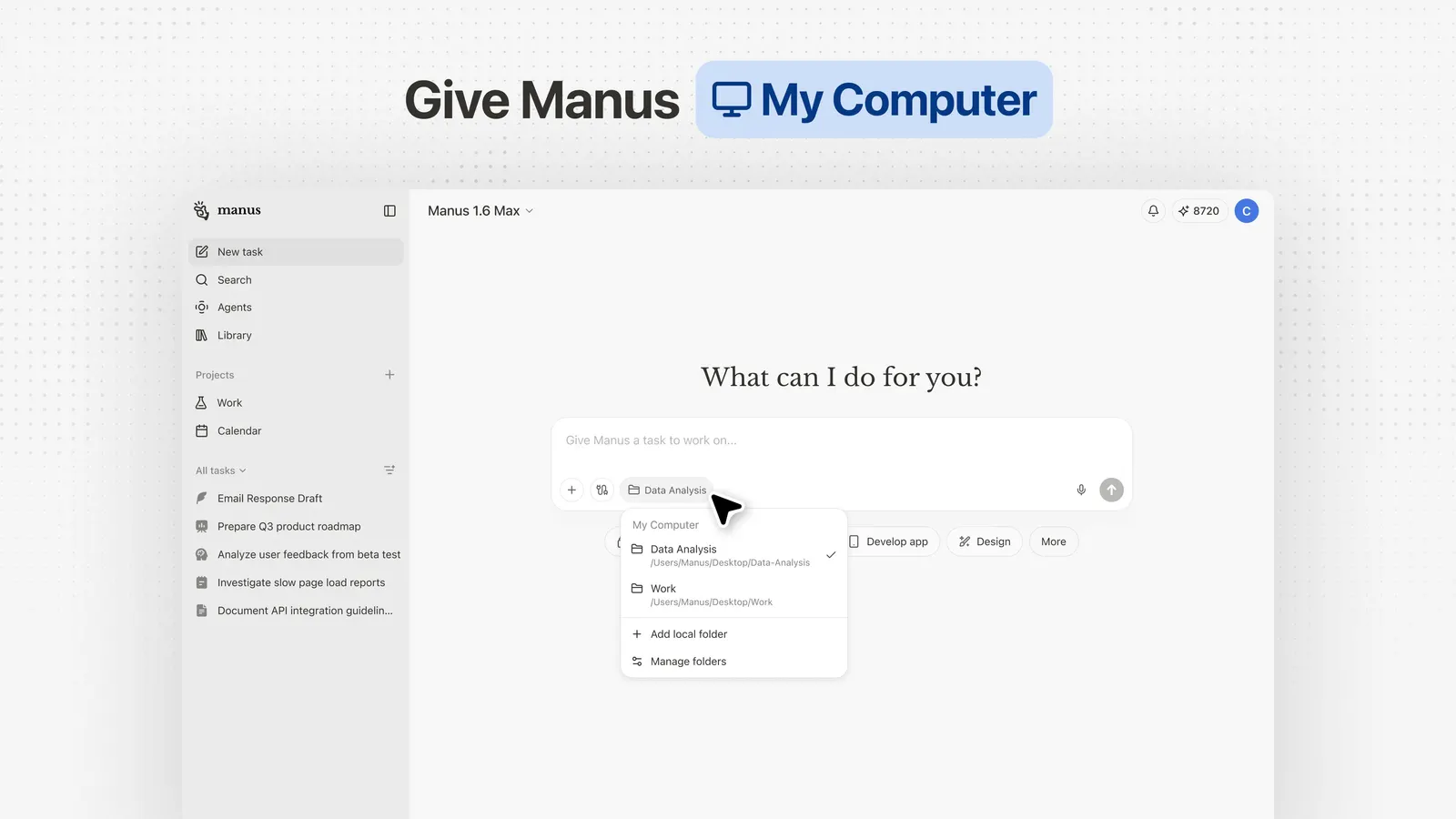
Best for: Individuals and small teams that want polished research, slides, websites, and other finished artifacts with little setup.
Pricing: Manus offers Free, Pro, and Team plans. Paid access and agent work use the plan and credit system provided by Manus.
Pros:
- Broad autonomous task execution
- Strong research and artifact creation
- Low setup for varied work
- Managed environment
Cons:
- Model choice is controlled by Manus
- Credit-based use can become expensive for frequent or long-running work
- Less control over the agent’s lasting configuration
- Not centered on several specialized coworkers improving over time
Verdict: Choose Manus when you want one capable general agent to produce finished work. It fits varied tasks better than a system you must configure and operate.
ChatGPT Work: best for general work in the OpenAI ecosystem
ChatGPT Work is an agent for longer, multi-step work and finished deliverables. It can research a topic, analyze information, and create documents, spreadsheets, presentations, reports, and websites.
Work fits naturally alongside ChatGPT and Codex. Chat handles fast questions and conversation. Work handles longer knowledge tasks. Codex handles software development. Projects, connected applications, voice, schedules, and event-triggered tasks make the wider product useful for people who already live in the OpenAI ecosystem.
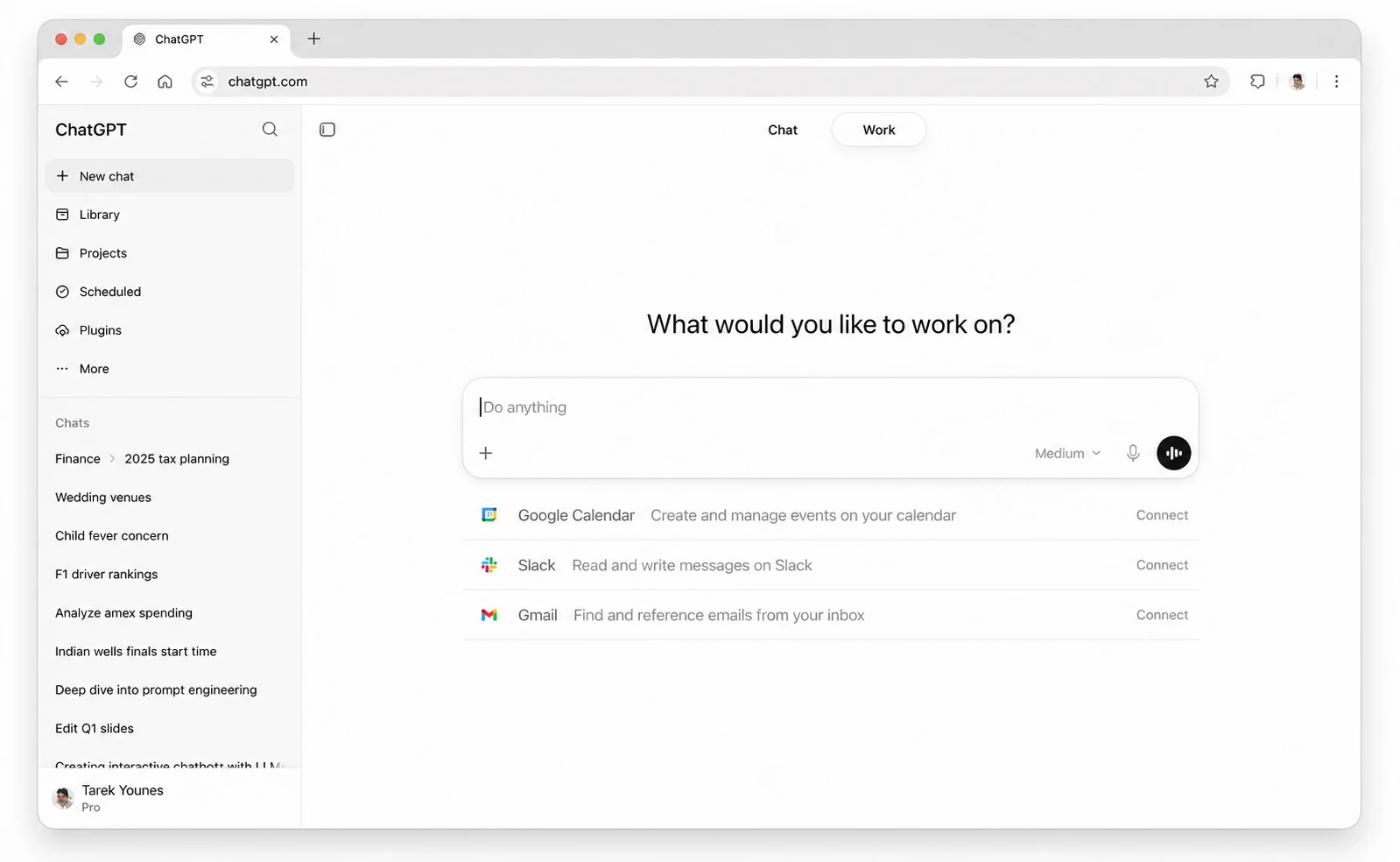
ChatGPT Work is designed around getting work done through OpenAI’s managed product. It is a strong task agent, but it does not give the user the same model freedom, self-hosting, or portable coworker configuration as an open workspace.
Best for: Individuals and teams that want a familiar managed product for broad knowledge work and coding.
Pricing: Work is included with eligible paid ChatGPT plans. Plus starts at $20 per month, while Business and Enterprise add team and administrative controls.
Pros:
- Broad range of outputs and connected work
- Familiar interface for existing ChatGPT users
- Projects, schedules, event triggers, and voice
- Codex for software development in the same product family
- Business and Enterprise team controls
Cons:
- Limited to OpenAI models
- Hosted inside OpenAI’s product and billing system
- Less control over portable agent configuration and infrastructure
Verdict: Choose ChatGPT Work when you already use ChatGPT and want a capable general task agent with minimal setup.
Claude Cowork: best for file-heavy knowledge work
Claude Cowork lets you hand Claude a goal, selected folders, and connected tools, then follow the work as it completes a multi-step task. It is especially useful when the job starts with documents and ends with a report, analysis, presentation, or reorganized set of files.
Cowork can run in the cloud or use the Claude desktop application to reach local folders, applications, browser sessions, and computer controls. Team and Enterprise plans add organization controls, tool permissions, spend management, and usage visibility.
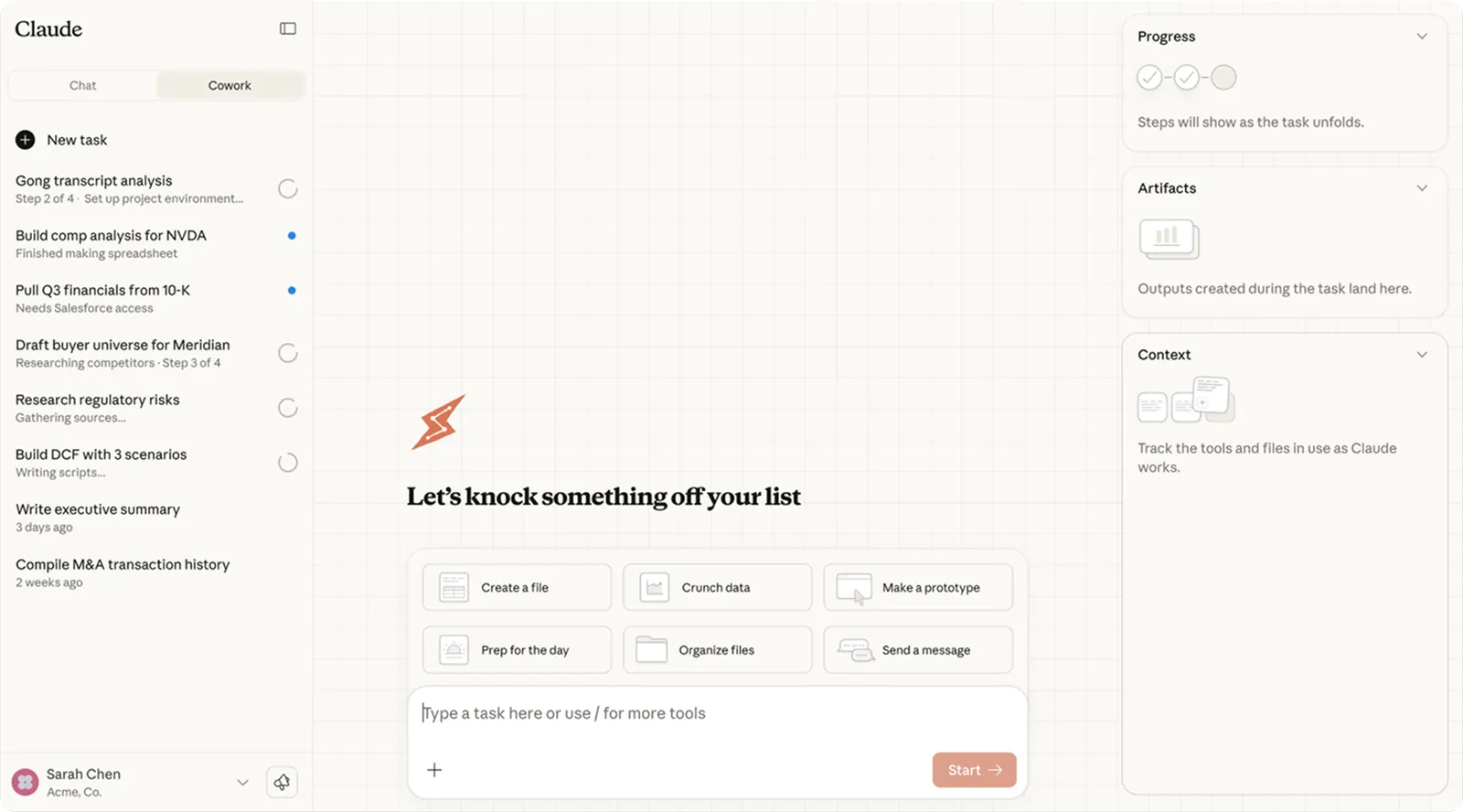
Claude Cowork is a strong task agent inside the Anthropic ecosystem. It can keep project context and run scheduled work, but the model remains Claude and the product does not center a portable team of independently configured coworkers. For products that add local execution, self-hosting, model choice, or shared coworker governance, compare the open-source Claude Cowork alternatives.
Best for: People and teams whose work begins with files, documents, connected applications, and project knowledge.
Pricing: Cowork is included with paid Claude plans. Pro costs $20 per month, Max starts at $100 per month, and Team starts at $20 per seat per month.
Pros:
- Strong analysis, writing, and file handling
- Local and cloud execution options
- Connected tools, computer use, schedules, and project context
- Team permissions and enterprise controls
- Clear approval flow for significant actions
Cons:
- Limited to Anthropic models
- Heavy agent work consumes plan capacity faster than chat
- Less portable and configurable than an open coworker workspace
Verdict: Choose Claude Cowork when your work centers on documents, local files, and Claude. It offers a focused path from source material to a finished deliverable.
Perplexity Computer: best for research across several models
Perplexity Computer extends Perplexity’s research product into longer agentic work. It can combine web research, data analysis, content creation, and other multi-step tasks while drawing on several advanced models inside one managed workspace.
Its natural strength is research. Perplexity has built its product around current web information and cited answers, so Computer fits work where the reader wants to trace important claims back to sources. The system chooses and coordinates models inside Perplexity rather than asking the user to configure an external provider for every step.
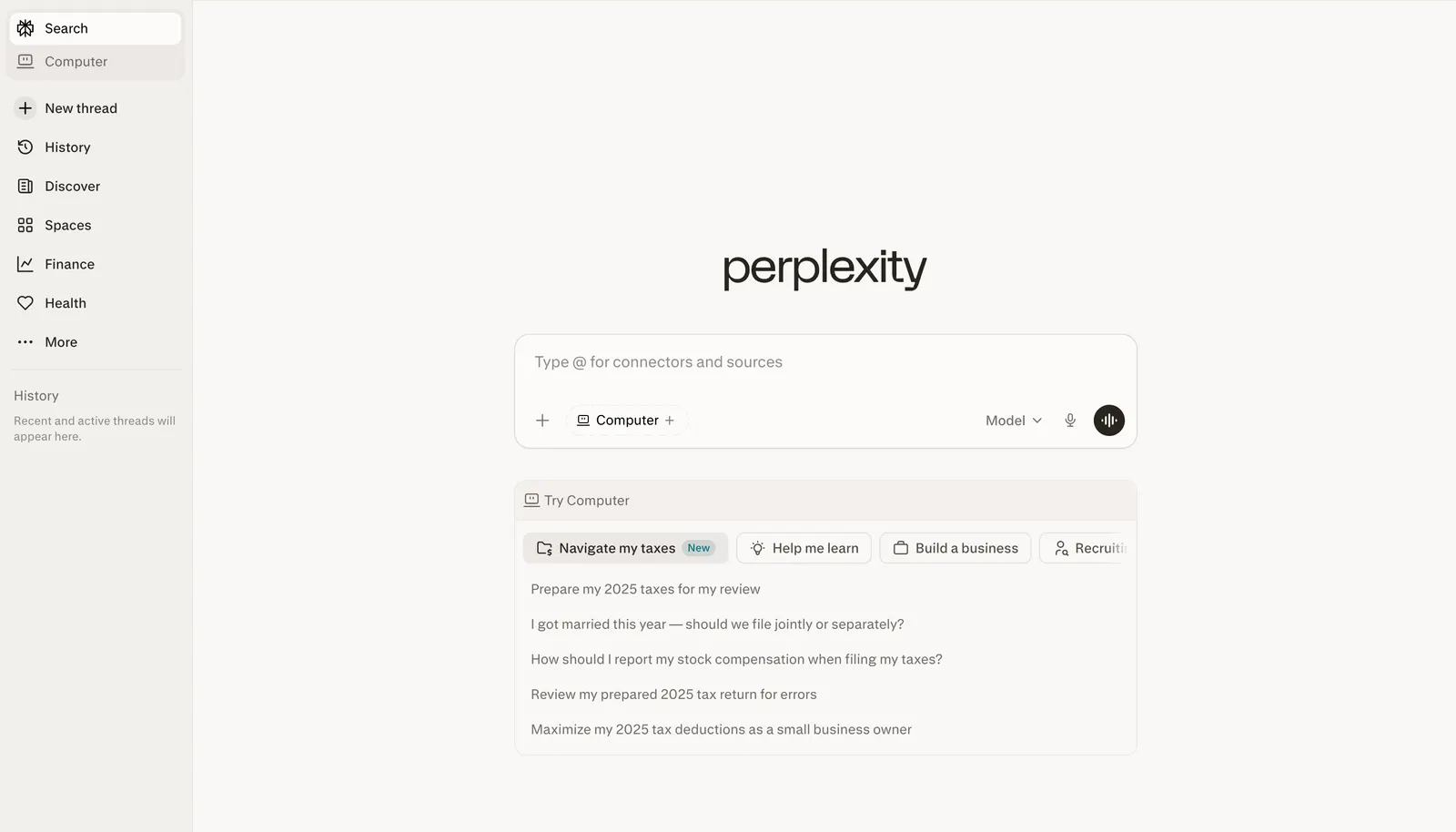
Best for: Research-heavy projects where cited sources and access to several models matter more than self-hosting or direct model control.
Pricing: Computer is available through paid Perplexity access and usage credits. The total cost depends on the plan and the work performed.
Pros:
- Strong web research and citation experience
- Access to several advanced models
- Managed workspace for multi-step projects
- Useful for analysis and content built from current information
Cons:
- The platform decides how models are orchestrated
- Usage credits can make long jobs harder to predict
- Not self-hostable
- Less focused on lasting team roles and editable coworker configuration
Verdict: Choose Perplexity Computer when the job starts with research and the source trail matters. It is a better fit for cited investigation than for owning a team of portable coworkers.
Lindy: best for business assistance and visual workflows
Lindy combines an AI assistant with templates, scheduled routines, approvals, integrations, computer use, and a visual flow editor. It is built for practical business jobs such as inbox management, meeting preparation, lead follow-up, support triage, and recurring reports.
Lindy is easier to start than a code-first automation system. Templates provide working starting points, and the visual editor lets users connect steps into repeatable processes. It can work through email, Slack, meetings, messaging, connected applications, and Model Context Protocol integrations.
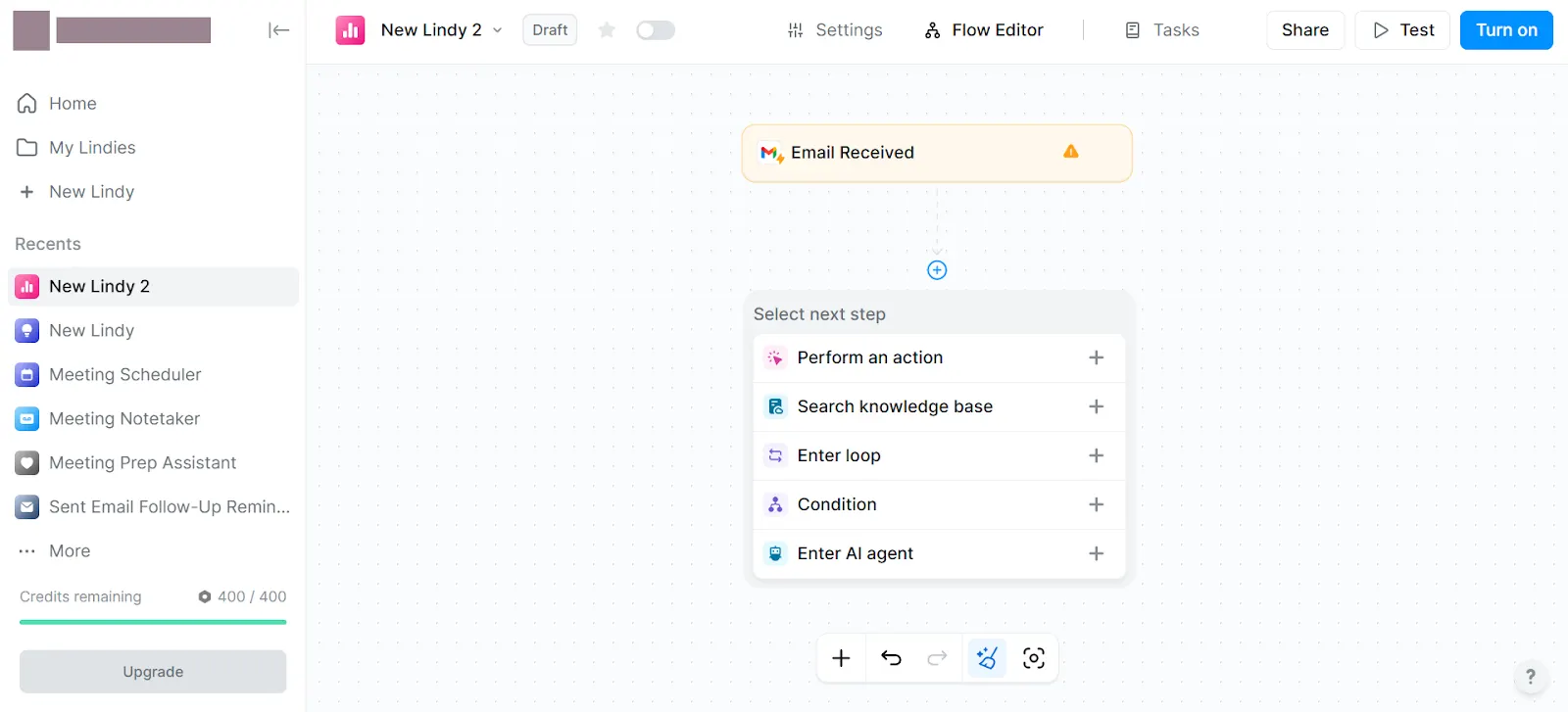
The product offers model selection and a friendly business interface, but its credit system and managed configuration give users less ownership than a self-hosted coworker workspace.
Best for: Teams that want ready-made business assistance and visual automation without operating a developer framework.
Pricing: Plus costs $29.99 per user per month with 3,000 credits. Pro costs $99.99 with 15,000 credits, and Max costs $199.99 with 35,000 credits.
Pros:
- Quick start for common business jobs
- Templates and visual workflow editor
- Scheduled routines and human approvals
- Thousands of integrations and several communication channels
- Selection among major AI models
Cons:
- Credit use varies with task complexity
- The underlying agent configuration is less portable
- Deep inspection and versioned governance are not the main product shape
Verdict: Choose Lindy when you want a practical business assistant with templates and visual workflows. It fits teams that value fast setup over owning the full coworker configuration.
Hermes Agent: best technical personal coworker
Hermes Agent is an open-source personal agent that learns across sessions, creates skills from experience, and improves those skills in use. It shares memory, sessions, skills, configuration, and API keys across its command-line, terminal, web, gateway, and desktop interfaces.
Hermes Desktop makes the agent easier to use on macOS, Windows, and Linux. The same core agent can work through a graphical desktop application or a terminal. Its plugin system lets developers add panels, commands, integrations, hooks, tools, and themes.
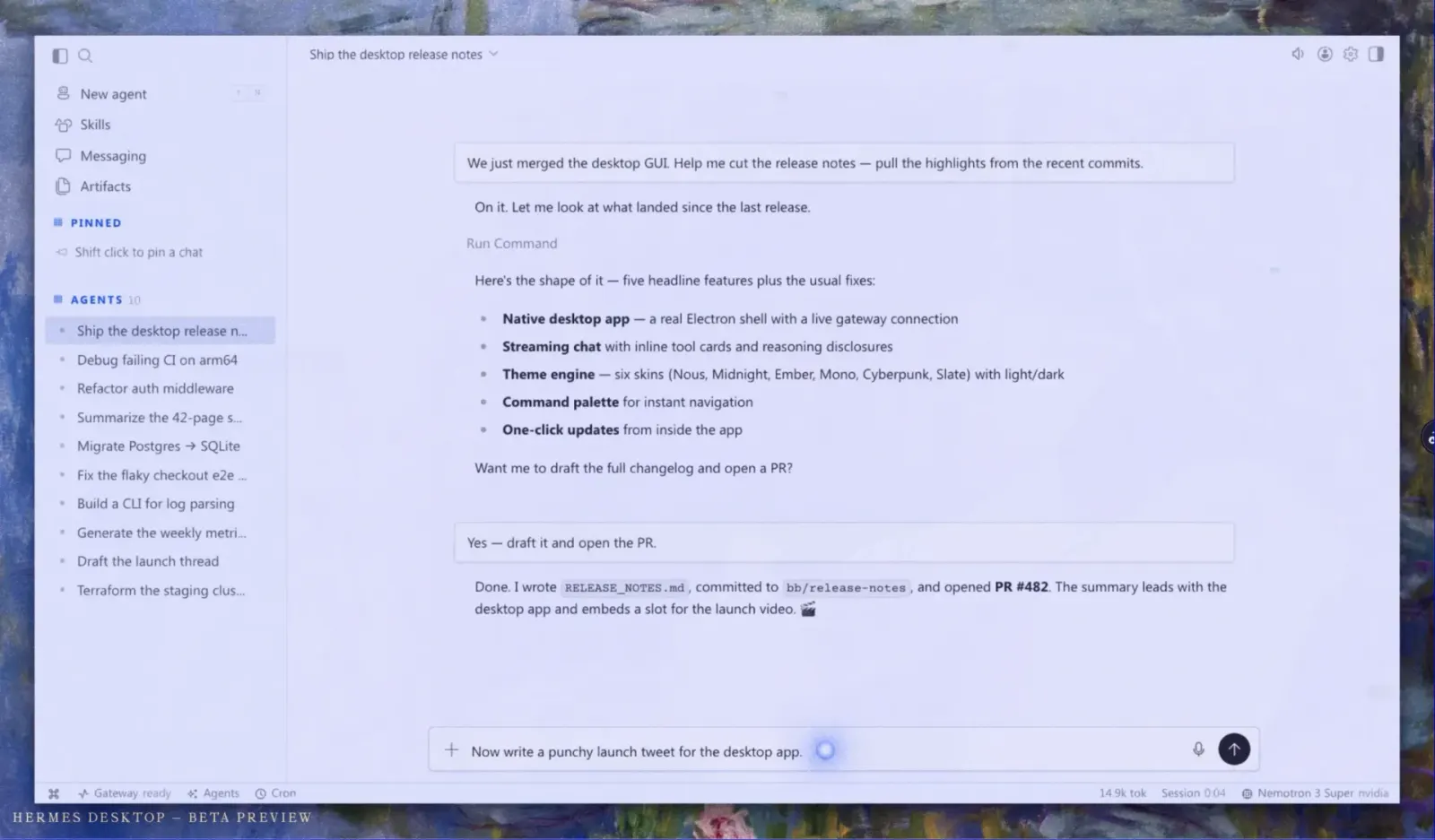
That makes Hermes highly customizable, but also highly technical. Writing and maintaining plugins requires code, and the product is centered on one person’s agent environment rather than a professional workspace where engineers govern coworkers for a larger business team.
Best for: Technical users who want a personal, self-improving agent across desktop and terminal interfaces.
Pricing: Hermes Agent is free and open source. Model and infrastructure costs depend on the configured providers and runtime.
Pros:
- Built-in learning loop and skill improvement
- Open source and deeply configurable
- Native desktop application plus terminal and web interfaces
- Shared memory and configuration across interfaces
- Extensible plugin system
Cons:
- Advanced customization requires code
- The operator owns model setup, permissions, security, and maintenance
- Not centered on non-technical business users or team governance
Verdict: Choose Hermes when you want to shape a personal agent in depth and are comfortable working close to the code. It is one of the strongest choices for technical customization and learning over time.
When Grok Bot is the right choice
Choose Grok Bot when you want several persistent agents, a managed cloud computer, shared working state, routines learned through demonstration, and minimal infrastructure decisions. It is especially compelling when convenience matters more than model choice, self-hosting, or granular team governance.
Which Grok Bot alternative should you choose?
- Choose Agenta for configurable professional coworkers that teams can share, inspect, version, and run on their chosen models or supported subscriptions.
- Choose OpenClaw for a self-hosted personal assistant across devices and messaging channels.
- Choose Manus for polished one-off research, slides, websites, and other deliverables.
- Choose ChatGPT Work for broad task work when you already use OpenAI.
- Choose Claude Cowork for document-heavy work and local files when you already use Claude.
- Choose Perplexity Computer for research where citations and access to several models matter.
- Choose Lindy for ready-made business assistance and visual workflows.
- Choose Hermes Agent for a technical personal agent that learns and can be extended through code.
The most useful distinction is whether you want an agent to finish a task, a workflow to repeat known steps, a personal assistant to live on your devices, or a coworker to keep a professional responsibility and improve with your team.
How to move from Grok Bot
Start with one real responsibility rather than trying to recreate every Bot at once.
- List each Bot’s job, routines, tools, files, credentials, schedules, and approval boundaries.
- Separate disposable tasks from ongoing responsibilities and fixed workflows.
- Save the instructions, examples, preferred output formats, and corrections that made the Bot useful.
- Identify which Bots share files, browser sessions, and application logins on the Grok Bot computer.
- Choose the target product based on the job. Use a task agent for changing requests, a workflow builder for known processes, and a coworker platform for lasting responsibilities.
- Run one real job in the old and new product with the same inputs and acceptance criteria.
- Move credentials and permissions deliberately. Give each new agent only the access its job requires.
- Move the strongest responsibility first, then repeat the process.
The hard part is not copying a prompt. It is preserving the working context, routines, access, preferences, and review points that made the Bot effective.
Related reading
- Open-source Claude Cowork alternatives
- The best Manus alternatives for tasks, coworkers, and workflows
- Prompt versioning: how teams preserve and improve AI behavior
- Prompt management for non-engineers
Frequently asked questions
What is the best Grok Bot alternative?
The best alternative depends on the work. Agenta is the strongest fit for configurable professional coworkers and team control. Manus is a strong general task agent. ChatGPT Work and Claude Cowork fit their existing ecosystems. OpenClaw and Hermes fit technical personal use. Lindy fits visual business workflows, while Perplexity Computer fits research.
Is Grok Bot different from ChatGPT or Claude?
Yes. An ordinary ChatGPT or Claude conversation helps with the current request. Grok Bot is organized around persistent, named agents with memory, tools, routines, and access to a cloud computer. ChatGPT Work and Claude Cowork add longer task execution, computer access, connected tools, and schedules, but remain centered on their own model ecosystems.
Which alternative is best for an AI coworker that learns?
Agenta is a strong choice for a professional coworker that improves through feedback and keeps visible, versioned configuration. Hermes is a strong technical personal option with a built-in learning loop. OpenClaw also supports a persistent personal assistant model, while Grok Bot remains one of the simplest managed experiences.
What is the best Grok Bot alternative for teams?
Agenta fits teams that want several configurable coworkers, shared access, permissions, model choice, cost visibility, and self-hosting. ChatGPT Business and Claude Team fit organizations already standardized on those providers. Lindy fits teams that prefer templates and visual workflows.
What is the best personal Grok Bot alternative?
OpenClaw is the strongest fit for technical users who want a self-hosted personal assistant across devices and channels. Hermes Agent is a strong option for people who want a desktop and terminal agent with deep customization and self-improvement.
Which alternatives let you choose the model?
Agenta, OpenClaw, and Hermes give the operator direct model choice. Lindy provides selection among major models inside its managed product. Perplexity Computer coordinates several models for the user. ChatGPT Work, Claude Cowork, Manus, and Grok Bot keep model choice inside their own platforms.
Which alternatives work with an existing AI subscription?
Agenta can use supported ChatGPT or Claude subscriptions when self-hosted. OpenClaw also supports subscription-backed model access. ChatGPT Work and Claude Cowork are included with eligible subscriptions from their respective providers.
Is there an open-source Grok Bot alternative?
Yes. Agenta, OpenClaw, and Hermes Agent are open source and self-hostable. Agenta focuses on professional coworkers and team operation. OpenClaw focuses on a personal assistant. Hermes focuses on a highly customizable personal agent with a learning loop.
How much do Grok Bot alternatives cost?
Managed products usually combine a subscription with limits or usage credits. Open-source products have no software license fee for self-hosting, but you still pay for models and infrastructure. Products that support your own API key, subscription, or cheaper model give you more ways to control the total cost.
Can I export a Grok Bot?
You can share a Grok Bot for someone else to copy, but that does not transfer your computer, logins, or conversation history. When moving to another product, preserve the Bot’s job, instructions, routines, files, examples, permissions, and learned preferences. Open systems with readable, versioned configuration make those parts easier to inspect and maintain.
Build AI coworkers your team can shape
If you want professional coworkers that keep working, learn through feedback, and remain visible to your team, try Agenta or view the MIT-licensed project on GitHub. Build each coworker around a real responsibility, choose the models and payment method that fit the work, and keep the configuration under your control.