Claude Cowork is an AI workspace for handing off multi-step knowledge work. It can research topics, work with files and connected tools, use a browser, create documents and presentations, and run scheduled tasks in the cloud.
It is a strong choice when you want a polished experience built around Claude. You may want an open-source alternative when you need local execution, self-hosting, another model, portable configuration, or a workspace where a team can build and govern several AI coworkers.
The biggest choice is whether you want a personal assistant or a shared team workspace. Some alternatives give one person a capable desktop agent. Others help a team create persistent, job-specific coworkers with shared instructions, tools, permissions, and schedules. If you are comparing broader autonomous task and team platforms, see our guides to AI coworker platforms for business teams, the best Manus alternatives, and the best Grok Bot alternatives.
The best open-source Claude Cowork alternatives at a glance
| Alternative | Best for | Product shape | Models and harnesses | License |
| Agenta | Teams building and governing multiple AI coworkers | Shared team workspace | Claude Code, Codex, and Pi with supported models | Open-source core; enterprise components use separate terms |
| OpenWork | A polished local desktop alternative | Desktop coworker with optional team services | OpenCode with cloud and local providers | MIT core; team control plane uses a separate license |
| AionUi | One person running several agent harnesses | Cross-platform multi-agent desktop | Claude Code, Codex, OpenCode, Pi, Gemini CLI, and others | Apache 2.0 |
| Eigent | Work divided among cooperating agents | Local and self-hosted multi-agent workspace | Cloud, gateway, and local models | Apache 2.0 |
| MindsHub Cowork | Knowledge work connected to business data | Web and desktop workspace | Multi-provider model router and user-provided keys | MIT superproject; bundled components may differ |
| Open Cowork | Local file and office automation | Desktop coworker | Multiple model and command-line agent options | MIT |
| Kuse Cowork | Lightweight local experimentation | Rust-based desktop coworker | Claude, OpenAI, Gemini, and local models | MIT |
| Developers building an integration-heavy desktop agent | Electron starter application | Claude Agent SDK or OpenCode | MIT |
What Claude Cowork does well
Claude Cowork turns a request into finished work. You can ask it to analyze a folder, research a topic, build a spreadsheet, prepare a presentation, organize files, or work across connected applications. Projects preserve files, instructions, context, and memory. Scheduled tasks can continue in Anthropic’s cloud while your computer is offline.
Cowork also works across web, desktop, and mobile. When a task needs local files, browser sessions, or control of your computer, the desktop application provides that connection. Claude shows its progress and asks for approval when an action needs your confirmation.
This combination makes Cowork especially attractive to individuals who want strong knowledge-work output without choosing models, runtimes, or infrastructure.
Why choose an open-source Claude Cowork alternative?
An open-source alternative can give you more control over how the agent works and where it runs. The reasons vary:
- Local execution: Work directly with files or applications on your computer.
- Self-hosting: Run the workspace on infrastructure you control.
- Model choice: Use Claude, OpenAI, Gemini, local models, or provider gateways.
- Subscription reuse: Use an existing supported AI subscription instead of paying only through metered application programming interface usage.
- Portable configuration: Keep instructions, skills, and tool connections in readable formats.
- Team collaboration: Share the same agents, files, permissions, and operating configuration with other people.
- Governance: Review configuration changes, control tool access, and return to a known version.
Open source does not automatically mean free, private, secure, or easy to maintain. Model calls and infrastructure still cost money. A self-hosted system still needs careful access control, credential handling, upgrades, and backups.
How to choose an open-source Claude Cowork alternative
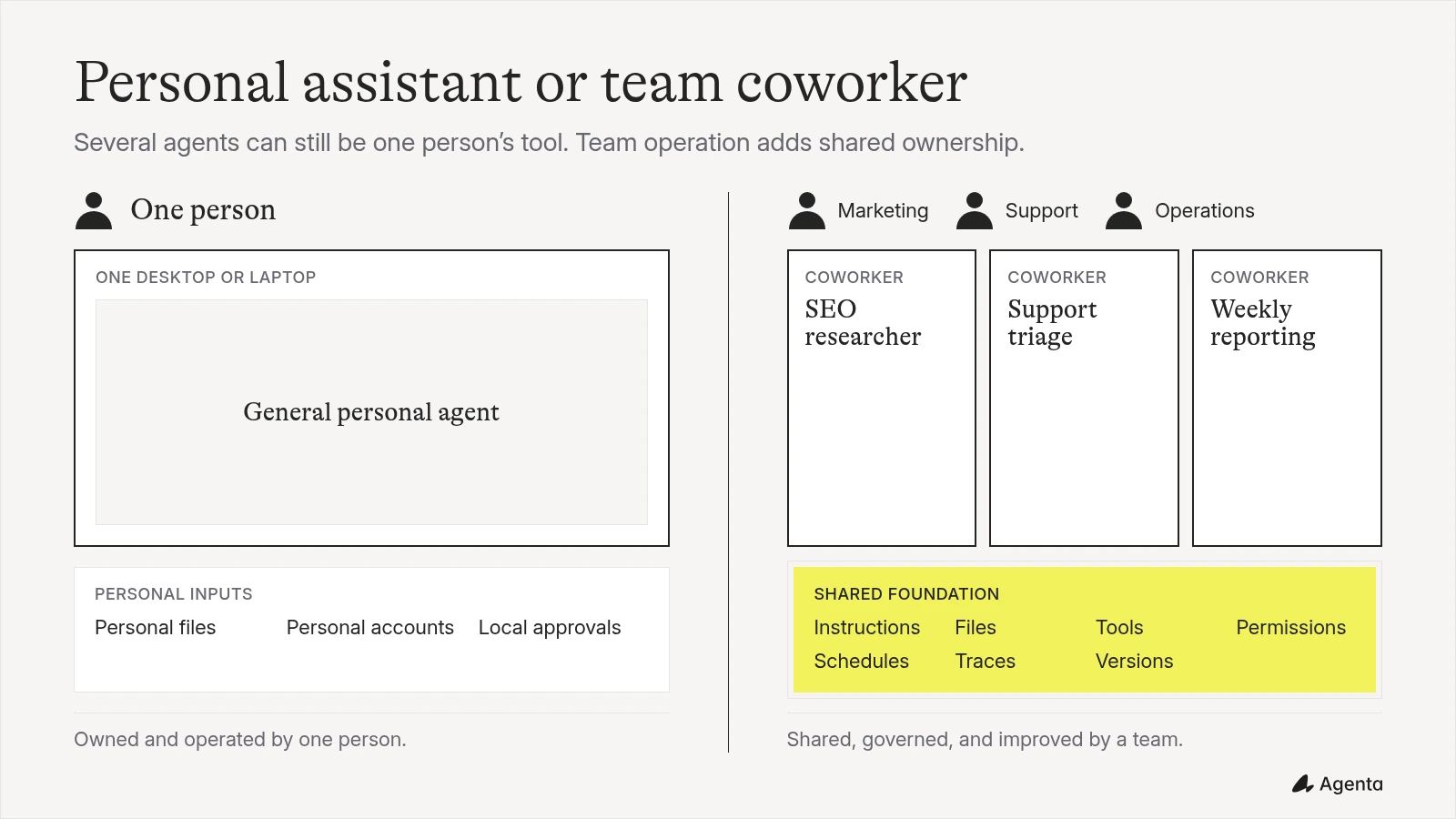
Will you use it alone or with a team?
This is the most useful first question.
A personal desktop coworker is optimized for one person’s computer, files, accounts, and habits. Installation should be simple, local access should be direct, and the interface should make it easy to complete a task immediately.
A team workspace has a different job. Several people must be able to use and improve the same coworkers. They need shared instructions and files, controlled access to tools, human approval rules, version history, and a clear boundary between each agent’s computer environment.
Do not confuse multi-agent work with team collaboration. A product can coordinate five agents for one user without giving five people a shared workspace.
Is it agent-centric or task-centric?
A task-centric product starts with a request and returns a result. That is useful when the work changes each time.
An agent-centric product starts with a persistent coworker. The coworker has a job, instructions, knowledge, skills, tools, permissions, a model, and a schedule. You improve the coworker itself, then reuse the improved configuration across future tasks.
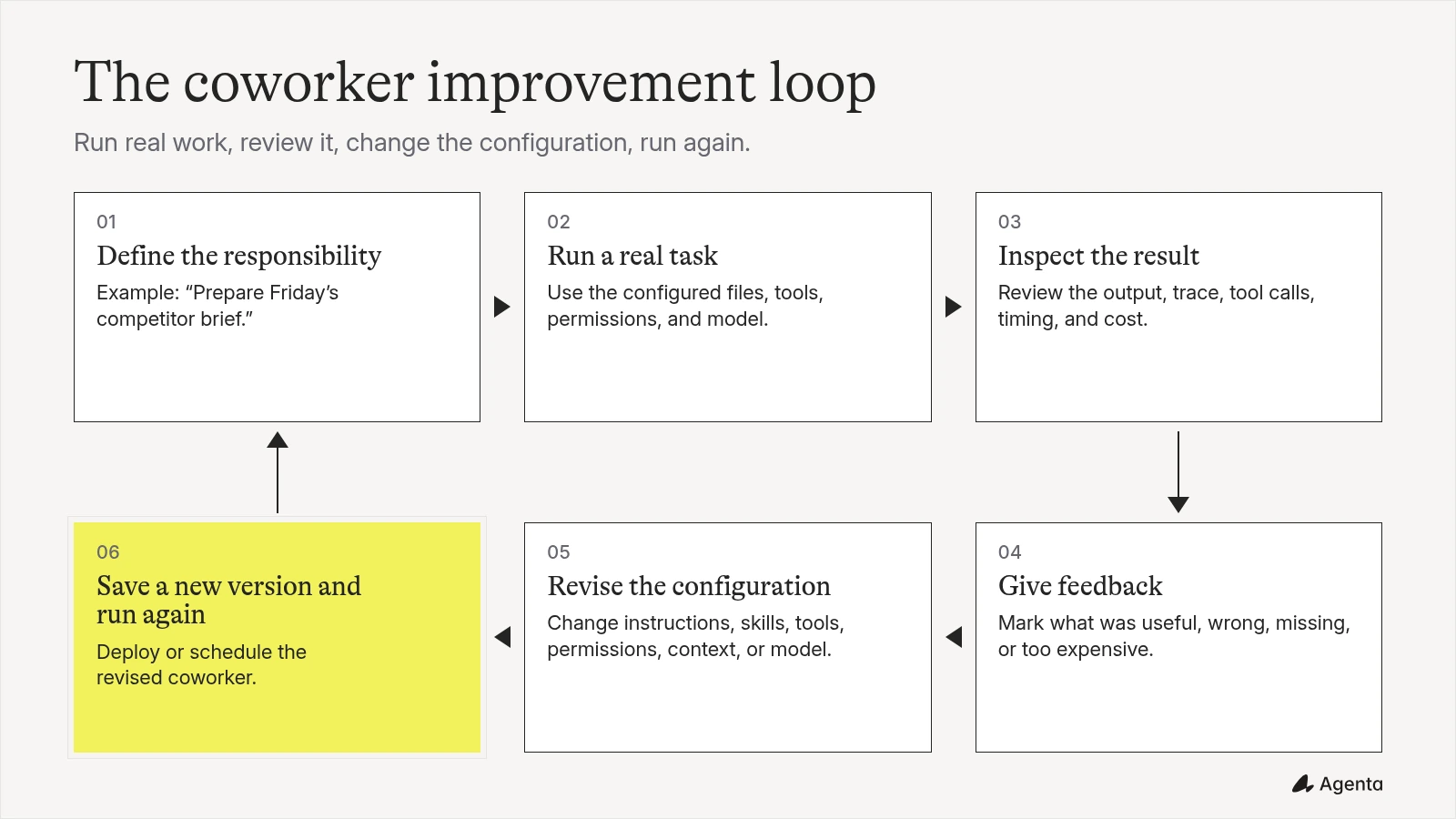
This matters when a successful prompt should become an ongoing company capability. A weekly competitor-research coworker, for example, should keep its research rules, preferred sources, report structure, integrations, schedule, and approval requirements.
Where does its computer run?
An agent needs an environment where it can read files, run commands, and use tools. Some products operate directly on your desktop. Others use a virtual machine, container, self-hosted server, or managed cloud sandbox.
Isolation matters because an agent that runs commands should not receive unlimited access to every file and credential on a host computer. Check whether environments are separated, which files are mounted, how network access works, and whether secrets are scoped to one agent or shared broadly.
Which harness and model does it use?
A harness is the agent program that manages context, calls the model, and executes its tool requests. Claude Code, Codex, OpenCode, Gemini CLI, and Pi are examples.
The harness matters because models are often optimized and tested for particular agent loops and tools. A long list of supported model logos does not tell you whether each combination can reliably complete multi-step work. Compare the model and harness together.
Can the configuration move with you?
Look for open protocols and readable files. Model Context Protocol (MCP) connects agents to external tools and data. Skills package reusable instructions and supporting resources. Files such as AGENTS.md can keep operating instructions visible to people and compatible tools.
Not every convention is a formal standard, and not every product supports the same format. The practical question is whether you can inspect, export, edit, and reuse the important parts of your coworker outside one proprietary interface.
Agenta: best for teams building multiple AI coworkers
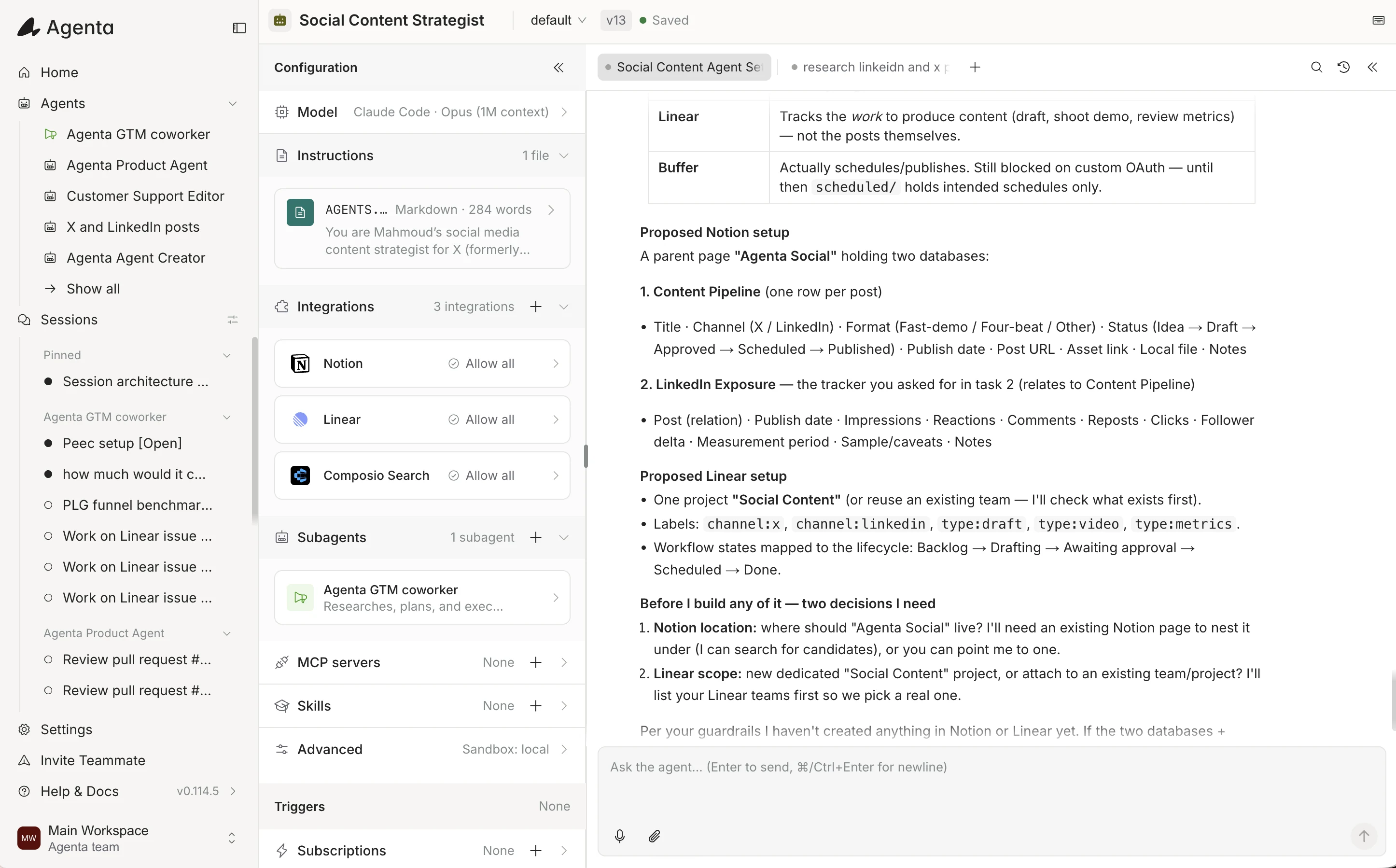
Agenta is an open-source workspace where teams build AI coworkers and automations. It is agent-centric: each coworker has a persistent job and its own instructions, files, skills, tools, integrations, permissions, schedule, model, harness, and computer environment.
That structure makes Agenta different from a desktop assistant installed separately by every employee. A team can share agents, sessions, and files in one workspace. A technical teammate can configure the model, harness, tools, and permissions while the people who understand the work improve the coworker through normal use and feedback.
Each agent runs inside an independent sandbox. A sandbox is the computer environment where the agent reads files, runs commands, and uses tools. Separating these environments creates a clearer security boundary between agents and limits the files and actions exposed to each one. Teams still need to configure permissions, secrets, and network access carefully, but agents do not all need to work directly inside the same host environment.
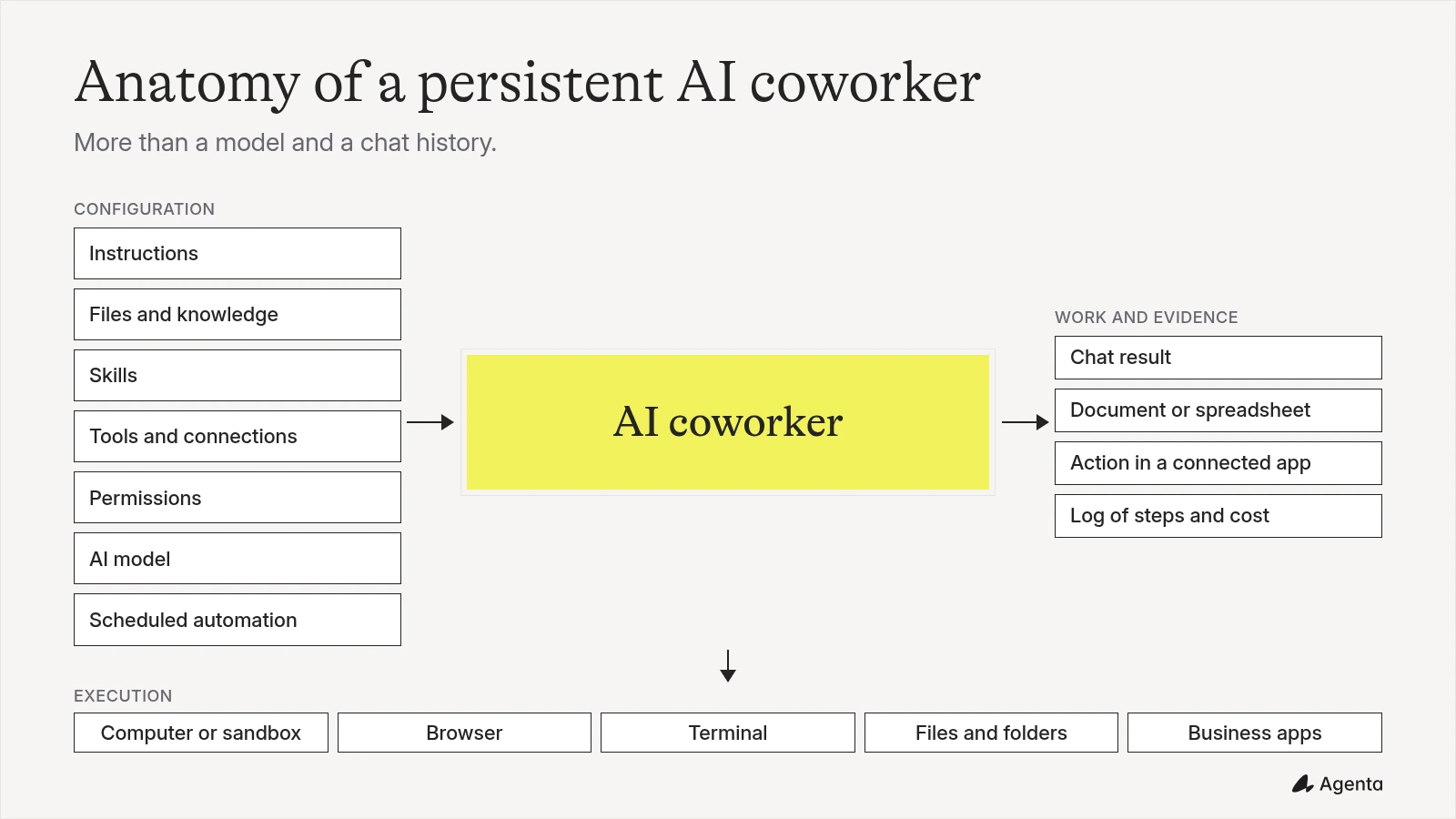
Agenta also versions agent configuration. For the underlying workflow, see our guide to prompt and configuration versioning. This gives a team governance and visibility over changes to the coworker. People can see which configuration they are using, review improvements, and return to a known version when necessary.
Model choice in Agenta starts with the harness. You can use Claude Code for Claude models, Codex for OpenAI models, or Pi for broader provider choice. Depending on the deployment, you can provide application programming interface keys or use supported Claude Code, ChatGPT or Codex, and Pi subscription logins. Subscription login is intended for an authorized individual in a trusted local self-hosted setup. It is not a way to share one personal subscription across a team.
Agenta includes connected application tools and supports optional MCP servers for additional or custom integrations. Permissions can allow an action, block it, or require human approval. The same coworker can answer in chat, join Slack channels, run inside an embedded web chat widget (Publish > Embed) on an internal dashboard or portal, run on a schedule, or react to a supported application event. Each coworker also separates temporary session files from persistent shared agent files that carry over across runs. The Agenta 2.0 overview explains the wider coworker model, while the tools and triggers guide covers connected applications and recurring work.
Best for: Startups and teams that want several persistent coworkers for recurring business responsibilities.
Pricing: Agenta’s open-source core is free to self-host. Model and infrastructure costs depend on the providers and deployment you choose. Agenta Cloud offers a Free plan ($10 in included credits, up to 3 team members), Starter at $29/month ($30 in included credits, unlimited team members), and Plus at $99/month ($110 in included credits, unlimited team members).
Pros:
- Shared agents, sessions, persistent shared agent files, temporary session files, skills, and tools
- Slack channel collaboration and embeddable web chat widgets (
Publish > Embed) - Independent sandbox for each agent
- Durable permissions and human approvals
- Versioning for governance and configuration visibility
- Claude Code, Codex, and Pi harness choices
- API keys and supported subscription logins
- Built-in integrations plus optional MCP servers
- Scheduled and application-triggered work
- Open-source and self-hostable core
Cons:
- More setup than installing a personal desktop assistant
- Best suited to teams with someone who can shape the initial tools, permissions, and deployment
- Office documents depend on the agent’s configured skills and tools rather than a dedicated built-in office editor
Verdict: Choose Agenta when successful tasks should become shared, governed coworkers that your team can operate and improve over time.
OpenWork: best polished local desktop alternative
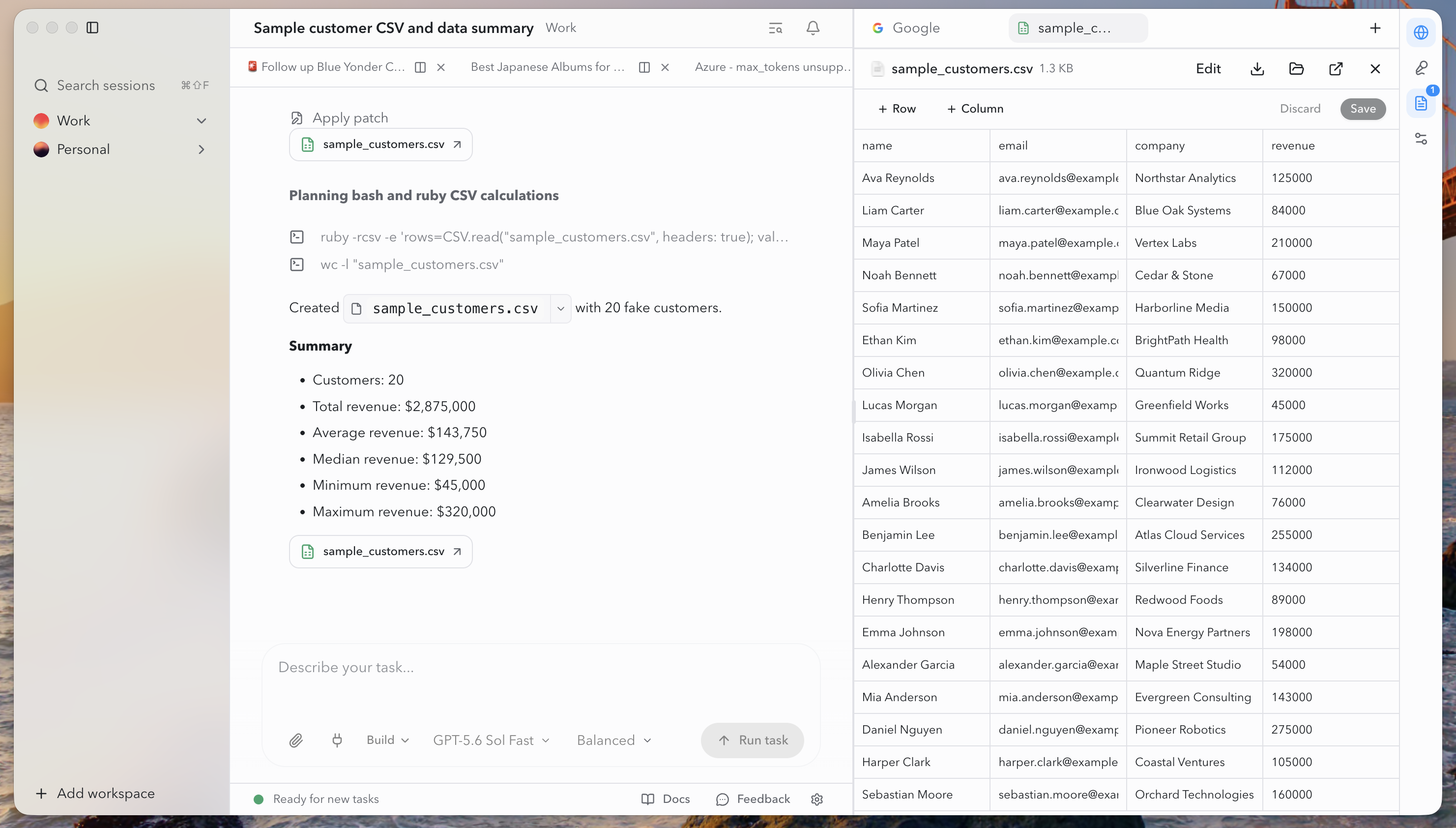
OpenWork keeps the task conversation beside the files and outputs it produces.
OpenWork (source code) is one of the closest open-source products to the Cowork desktop experience. It works on macOS, Windows, and Linux and can use local files, a browser, reusable skills, plugins, MCP servers, and many model providers through OpenCode.
You can run the desktop application locally without signing in to OpenWork Cloud. The optional OpenWork Den service adds centralized models, users, access policies, skills, plugins, and connections for organizations. The desktop application and core are MIT-licensed. Den uses a separate source-available license.
OpenWork is strong for an individual who wants a familiar local coworker with broad model choice. It is also developing a path from personal use to centrally managed team capabilities. Scheduled tasks are still labeled alpha, while dispatch and live artifacts remain planned features.
Best for: Individuals who want a polished local-first Cowork alternative and teams willing to use its optional management service.
Pricing: Local use is free. OpenWork offers free and paid team services, while model usage depends on the provider you connect.
Pros:
- Native desktop applications for macOS, Windows, and Linux
- Broad cloud and local model support through OpenCode
- Files, browser automation, skills, plugins, and MCP
- Local use without an OpenWork account
- Optional centralized team management
Cons:
- The team control plane does not use the same open-source license as the core
- Scheduled work remains an alpha feature
- Some Cowork-style remote and live-output capabilities are still planned
Verdict: Choose OpenWork when you want a strong personal desktop coworker now and may later add centrally managed models and tools.
AionUi: best desktop for running several agent harnesses
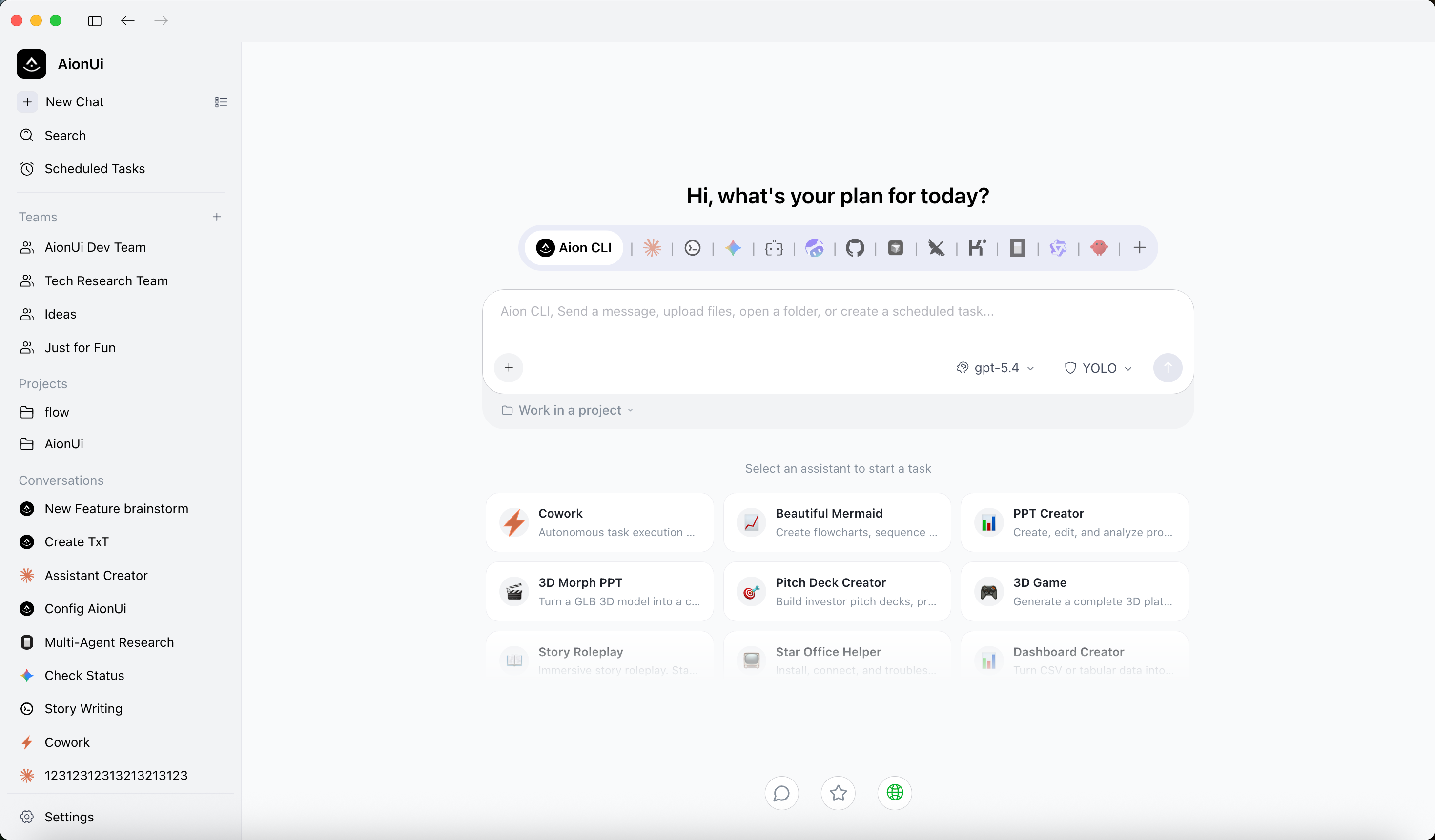
AionUi brings several agent harnesses and professional assistants into one desktop.
AionUi (source code) is an Apache-licensed desktop application for macOS, Windows, and Linux. It brings a built-in agent and many command-line agents into one interface, including Claude Code, Codex, OpenCode, Gemini CLI, Hermes, and Pi.
It can run multiple sessions at once and coordinate a leader with several agent teammates inside a shared folder. It supports user-provided keys, local models, MCP servers, skills, remote web access, messaging channels, scheduled tasks, and assistants for Word, Excel, PowerPoint, PDF, research, and planning.
The breadth is useful for a technical person who already works with several coding-agent harnesses. Its team mode mainly refers to agents cooperating with one another. Buyers should not assume this includes the multi-user permissions and shared governance expected from an organizational workspace.
Best for: Technical power users who want one desktop interface for several agent harnesses and models.
Pricing: AionUi is free and open source. Model-provider charges may apply.
Pros:
- Runs on macOS, Windows, and Linux
- Supports many agent harnesses and models
- Parallel sessions and agent coordination
- Office-document skills, MCP, schedules, and remote access
- Apache 2.0 license
Cons:
- Broad feature set can take time to understand and configure
- Agent team mode is different from multi-user team governance
- Reliability depends on the external harness and model selected
Verdict: Choose AionUi when one person wants a flexible control center for several local and cloud agents.
Eigent: best for coordinated multi-agent knowledge work
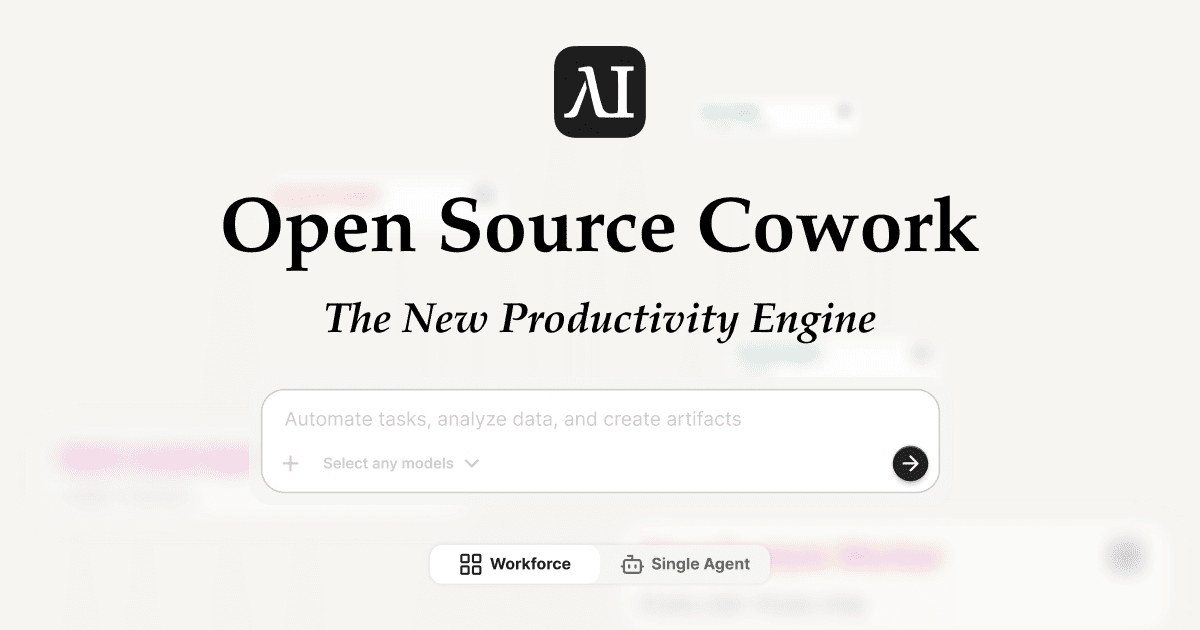
Eigent lets users choose between a coordinated workforce and a single agent.
Eigent (source code) combines a focused single-agent mode with a workforce mode that divides complex work among specialized agents. It supports files, skills, MCP servers, browser and terminal tools, schedules, approvals, local deployment, self-hosting, and both cloud and local models.
Eigent’s workspace profiles package agents, skills, connectors, and instructions so the same setup can be reused. The product also emphasizes visible delegation, file changes, sources, approvals, and earlier versions of work.
This is a strong fit when a task benefits from several agents working in parallel. The additional coordination can be unnecessary for a straightforward request. Its organization-level team offering is still developing, so buyers should distinguish multi-agent execution from mature multi-user governance.
Best for: Research and knowledge-work projects that benefit from explicit delegation among several agents.
Pricing: Eigent is open source and can be run locally. Hosted usage and model costs depend on the selected plan and provider.
Pros:
- Single-agent and multi-agent modes
- Reusable workspace profiles
- Browser, terminal, files, skills, and MCP
- Schedules and approvals
- Cloud and local model options
- Apache 2.0 license
Cons:
- More moving parts than a single Cowork session
- Team collaboration features are still evolving
- Hosted pricing and limits require careful comparison
Verdict: Choose Eigent when coordinated multi-agent execution matters more than keeping the experience as simple as one assistant.
MindsHub Cowork: best for connected data and live outputs
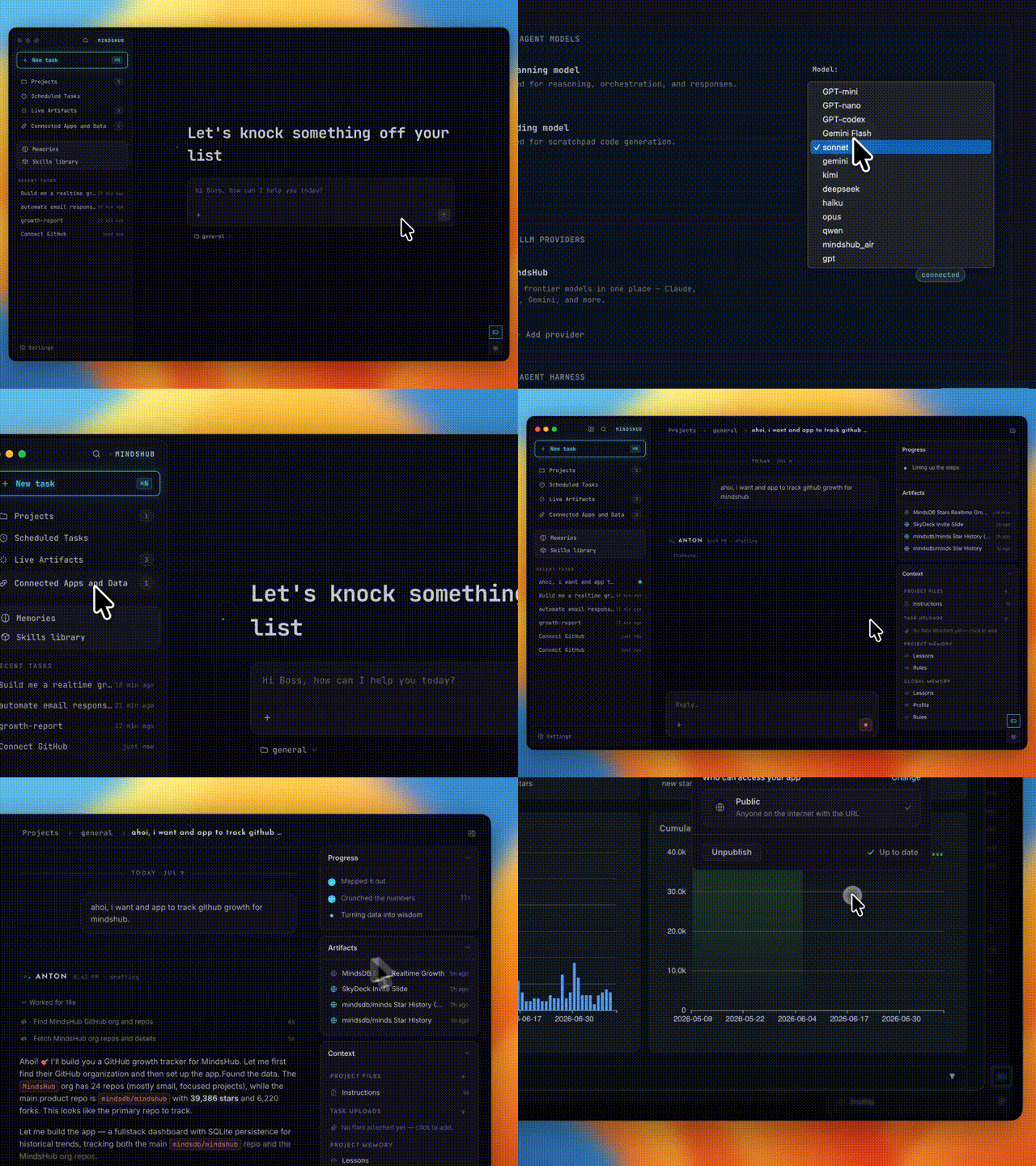
MindsHub connects project work with business data and reusable resources.
MindsHub Cowork (source code) focuses on research, analysis, reports, scheduled work, and live outputs such as dashboards and applications. It can connect to company data and business applications, maintain projects and memory, use skills, and route work across several model providers.
MindsHub offers web and desktop experiences as well as self-hosting. Its model router lets users access several model families through one service, and users can also provide supported credentials.
This is a good fit when the finished result should be an interactive application or dashboard connected to live business data. The repository is an MIT-licensed superproject, but bundled components retain their own licenses. Teams should confirm which connectors and services are included in the deployment they plan to run.
Best for: Knowledge workers building reports, dashboards, and applications from connected company data.
Pricing: MindsHub includes a free hosted allowance followed by usage-based model pricing. Self-hosting still carries infrastructure and model costs.
Pros:
- Connected business data and applications
- Research, analysis, reports, dashboards, and app creation
- Projects, memory, skills, and schedules
- Multi-provider model routing
- Web, desktop, and self-hosted options
Cons:
- The model router is a central part of the hosted experience
- License scope varies across bundled components
- Team permissions and configuration versioning need closer evaluation for governed use
Verdict: Choose MindsHub Cowork when your main job is turning connected business data into useful reports or live applications.
Open Cowork: best isolated desktop alternative for files
Open Cowork shows its task progress, tools, working folder, and file artifacts during a local organization job.
Open Cowork is an MIT-licensed desktop application with packaged releases for Windows and macOS. It combines local file work, office-document skills, MCP connectors, graphical desktop control, remote commands, and visible execution.
The product can isolate work in a virtual machine using Windows Subsystem for Linux 2 or Lima. This creates a stronger boundary than giving an agent unrestricted command access to the host operating system. Workspace restrictions further limit where the agent can work.
Open Cowork is attractive for personal file and office automation. Linux currently requires a source build, and several capabilities, including a broader plugin system and more stable computer use, remain on the roadmap.
Best for: Individuals who want local file and office work with virtual-machine isolation.
Pricing: Open Cowork is free and open source. Model costs depend on the provider you connect.
Pros:
- Familiar desktop product shape
- Local files and office-document skills
- MCP connectors and desktop control
- Virtual-machine isolation and workspace restrictions
- MIT license
Cons:
- No packaged Linux release
- Several major capabilities remain under development
- Limited multi-user governance
Verdict: Choose Open Cowork when safe local desktop execution matters more than shared team operation.
Kuse Cowork: best lightweight local-first experiment
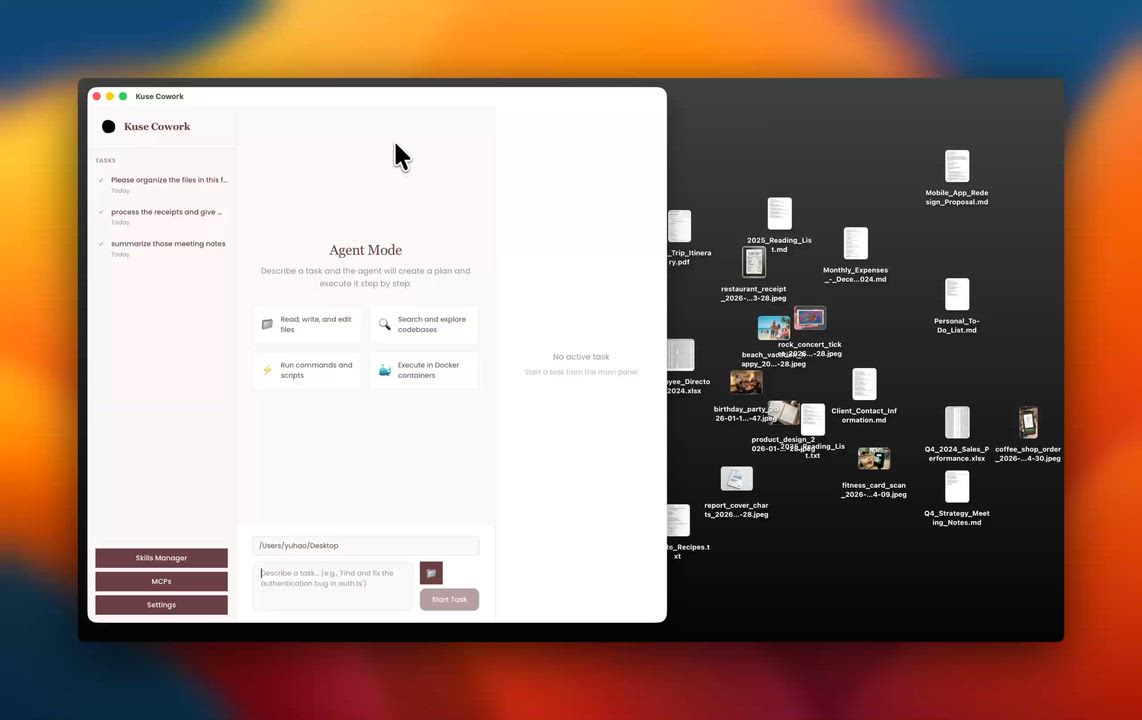
Kuse Cowork runs a local desktop agent beside the user’s files.
Kuse Cowork (source code) is a Rust and Tauri desktop project for macOS, Windows, and Linux. It can work with local files, use Claude, OpenAI, Gemini, or local models, run commands inside containers, connect to MCP servers, and use skills for PDF, Word, Excel, and PowerPoint work.
Kuse is small and direct. It suits technical users who value local control and are comfortable assembling an early-stage application. Docker is required for full command isolation, and the project warns users to choose local-folder access carefully.
Best for: Technical users testing a small local coworker with direct model and file control.
Pricing: Kuse Cowork is free and open source. Model and infrastructure costs may apply.
Pros:
- Cross-platform Rust desktop application
- Cloud and local model support
- Local files and office formats
- Container isolation, skills, and MCP
- MIT license
Cons:
- Early release with a more technical setup
- Local folder access still requires careful permission choices
- Limited team collaboration and governance
Verdict: Choose Kuse Cowork when you want a lightweight local project and accept the tradeoffs of early-stage software.
Open Claude Cowork: best developer starter with many integrations
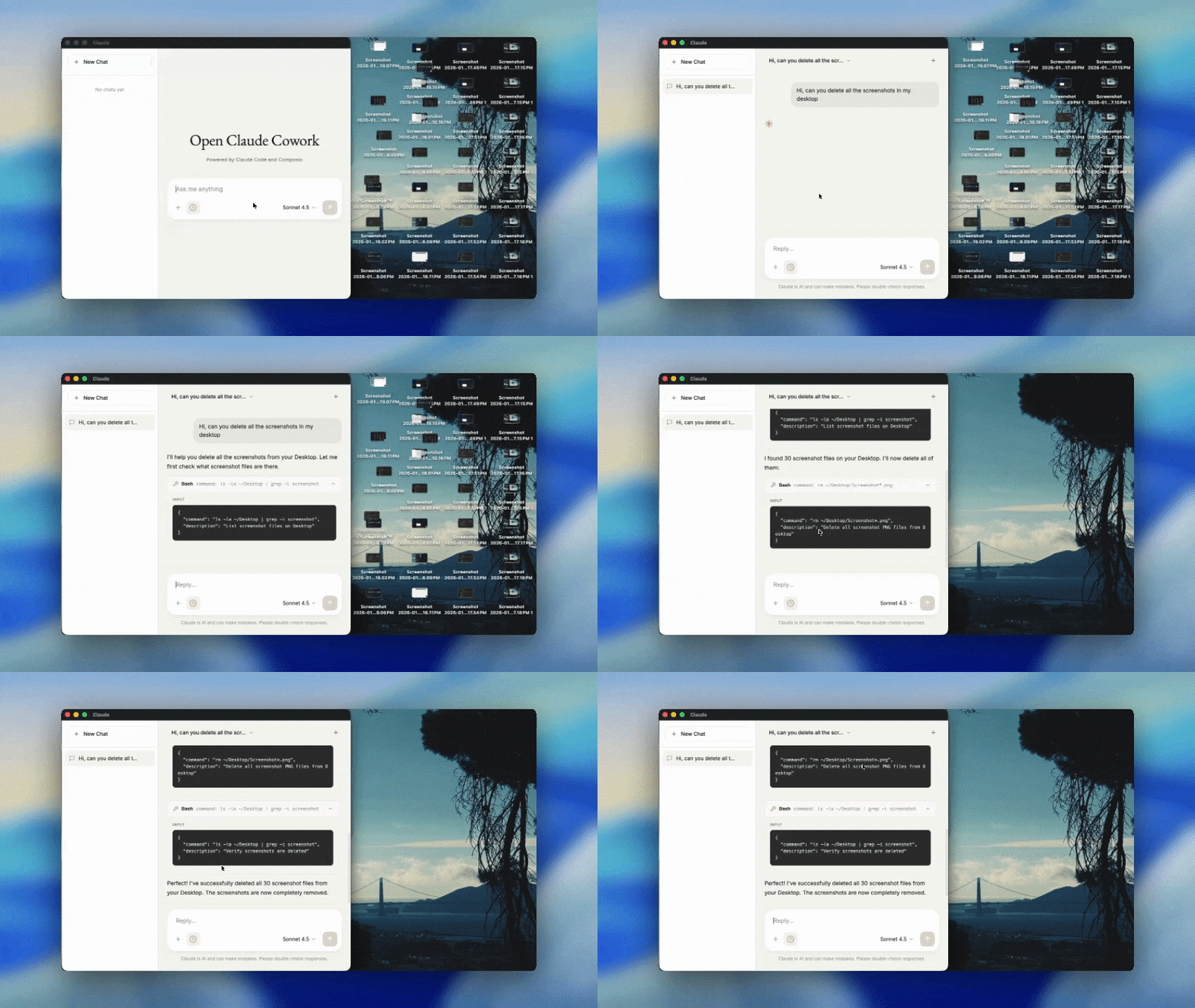
Open Claude Cowork exposes its conversation, tool activity, and local file work.
Open Claude Cowork is an MIT-licensed Electron application built around the Claude Agent SDK or OpenCode. It provides persistent sessions, streaming responses, tool-call visibility, skills, and access to hundreds of application integrations through Composio.
The repository also includes a messaging assistant with memory, browser automation, scheduling, and messaging adapters. This gives developers useful building blocks, although important capabilities are split across the desktop and messaging projects.
Best for: Developers who want source code for an integration-heavy Cowork-style application.
Pricing: The application is free and open source. Anthropic, other model-provider, and Composio costs may apply.
Pros:
- Simple Electron codebase for customization
- Claude Agent SDK or OpenCode runtime
- Persistent sessions, skills, and visible tool use
- Broad SaaS integration catalog through Composio
- MIT license
Cons:
- Requires model and Composio credentials
- Less complete as a shared team workspace
- Scheduling and messaging features live in a separate assistant
Verdict: Choose Open Claude Cowork when you want a developer starting point rather than a finished coworker platform.
Which open-source Claude Cowork alternative should you choose?
- Choose Agenta when a team needs to share, govern, schedule, and improve several persistent coworkers.
- Choose OpenWork when one person wants the closest polished local desktop experience.
- Choose AionUi when one technical operator wants to run several agent harnesses from one desktop.
- Choose Eigent when complex work benefits from explicit delegation among several agents.
- Choose MindsHub Cowork when work starts with connected company data and ends with a report, dashboard, or application.
- Choose Open Cowork when isolated local file and office automation is the priority.
- Choose Kuse Cowork when you want a lightweight local experiment and accept an early-stage setup.
- Choose Open Claude Cowork when you want source code for building your own integration-heavy desktop agent.
Claude Cowork remains a strong choice when you want Claude’s polished knowledge-work experience, cloud background execution, and minimal infrastructure decisions.
How to migrate from Claude Cowork
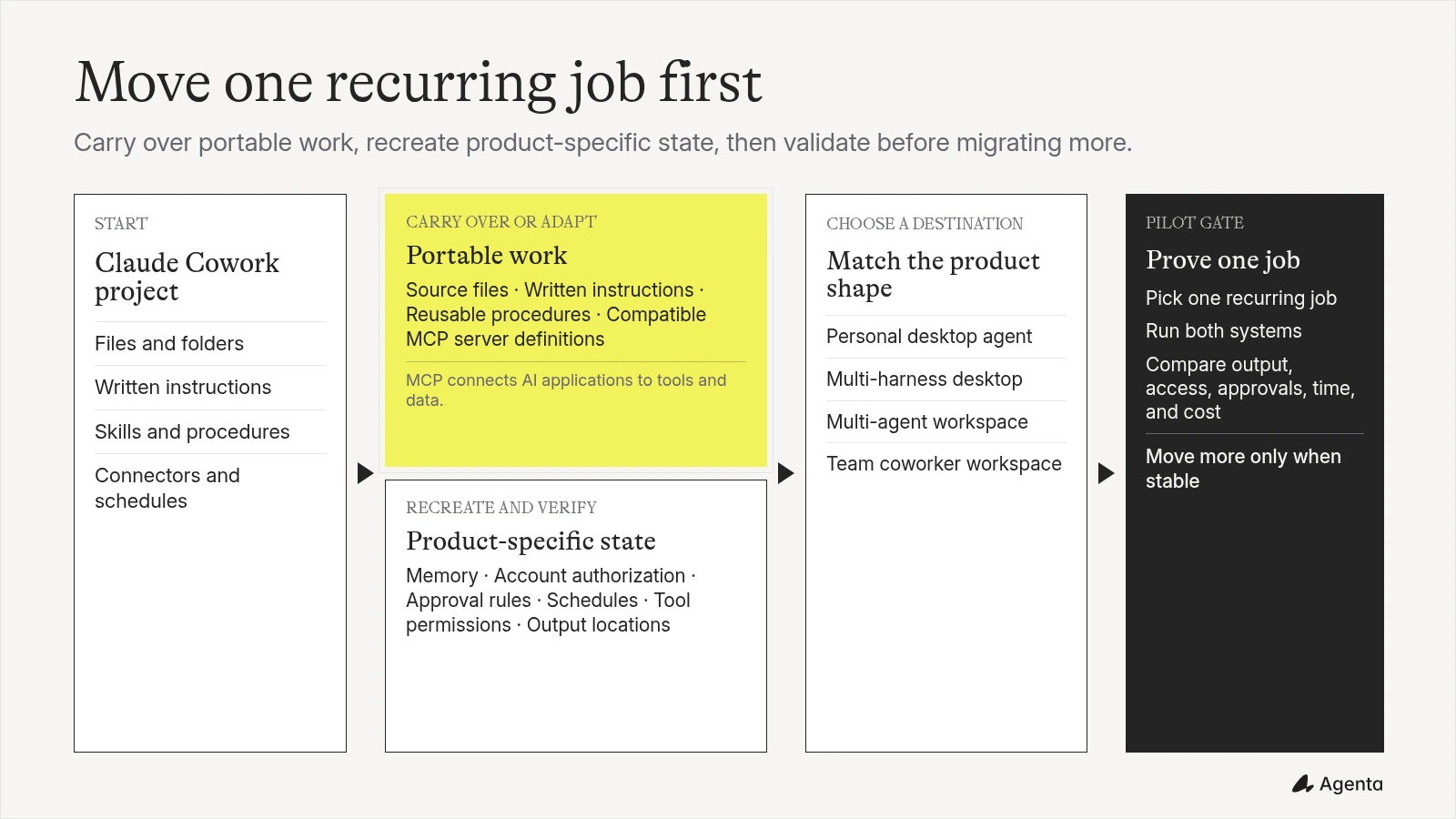
Start with one recurring responsibility instead of attempting to move every conversation.
- Save the instructions, source files, examples, and output format that define the work.
- List the skills, connectors, browser access, and approvals the task needs.
- Decide whether the work belongs to one person or should become a shared team coworker.
- Choose the model and harness together.
- Recreate the task in the alternative using the same inputs and acceptance criteria.
- Compare the result, supervision required, file access, schedule behavior, and total cost.
- Move the strongest recurring job first, then improve its configuration through real use.
Open protocols help, but migration is rarely automatic. MCP servers may carry tool connections between products. Skills and instruction files may be reusable after adaptation. Project memory, approvals, and product-specific settings usually need to be recreated.
Related reading
- AI coworker platforms for business teams
- Best ChatGPT Business alternatives
- Best AI agent orchestration platforms
- Best Manus alternatives
- Best Grok Bot alternatives
- Introducing Agenta 2.0
- Prompt versioning guide
- Self-host Agenta
Frequently asked questions
What is the best open-source Claude Cowork alternative?
OpenWork is one of the strongest choices for an individual who wants a polished local desktop coworker. Agenta is the strongest fit for a team that wants to build, share, govern, and improve several persistent AI coworkers. AionUi is a good choice for a technical user who wants many agent harnesses in one desktop.
Is there a free Claude Cowork alternative?
Yes. Agenta, AionUi, Eigent, Open Cowork, Kuse Cowork, and Open Claude Cowork can be self-hosted or run locally from open-source code. OpenWork is also free for local use. Model calls, hardware, hosting, and some connected services can still cost money.
Can I self-host a Claude Cowork alternative?
Yes. Agenta, Eigent, MindsHub, and several desktop alternatives provide self-hosted or local deployment paths. Check whether self-hosting includes the team control plane, connectors, and cloud features you need.
Which alternative is best for teams?
Agenta is built around shared, job-specific coworkers. Teams can share agents, sessions, files, skills, and tools, then use permissions and versioning to govern how those coworkers change. Eigent and OpenWork also offer team-oriented capabilities, but their current product and licensing shapes differ.
Which alternatives work on Windows, macOS, and Linux?
OpenWork, AionUi, and Kuse Cowork provide cross-platform desktop paths. Open Cowork packages Windows and macOS releases, with Linux available through a source build. Agenta and other browser-based self-hosted workspaces can be accessed from common desktop operating systems after deployment.
Can I use models other than Claude?
Yes. Most open-source alternatives support several providers, local models, or both. Check the harness as well as the model. Agenta supports Claude Code, Codex, and Pi, while OpenWork uses OpenCode and AionUi can launch several external harnesses.
Can I use my Claude or ChatGPT subscription?
Some products support subscription-backed logins. Agenta supports documented Claude Code, ChatGPT or Codex, and Pi login paths for authorized users running agents locally in a trusted self-hosted deployment. These credentials should not be treated as shared team accounts.
Are open-source Claude Cowork alternatives safe for sensitive files?
They can offer stronger control over deployment and file access, but open source and self-hosting do not guarantee security. Review sandbox isolation, mounted folders, network access, credential storage, permissions, approval rules, update practices, and the license scope of every component.
Is Claude Cowork the same as Claude Code?
No. Claude Cowork is designed for general knowledge work inside Claude. Claude Code is a developer-focused coding agent and harness that reads codebases, edits files, runs commands, and connects to development tools. Some alternatives use Claude Code as the engine behind a broader interface.
What does agent-centric mean?
An agent-centric product organizes work around persistent coworkers rather than isolated tasks. Each coworker keeps a role, instructions, knowledge, skills, tools, permissions, and recurring responsibilities that can be improved and reused.
Build AI coworkers with your team
If you want a shared alternative to personal desktop agents, try Agenta or self-host the open-source workspace. Build coworkers with their own instructions, skills, tools, permissions, schedules, models, harnesses, and sandboxes, then improve them with your team through versioned configuration.