AI coworker platforms are moving beyond chat. They can research, work with files, use business applications, run on a schedule, ask for approval, and preserve instructions for the next job. The products in this guide overlap, but they are built around different units of work.
Some are strongest at completing a substantial request. Others help teams define a reusable role or assemble a predictable workflow. That distinction matters more than the number of integrations on a pricing page.
Direct answer: Choose Claude Cowork or ChatGPT Work for document-heavy work, Microsoft 365 Copilot Cowork for work inside Microsoft 365, Zapier or n8n for app automation. Choose Agenta when a team needs configurable, shared autonomous coworkers with model and deployment control.
| Platform | Best for | Product shape | Deployment | Starting price or model |
|---|---|---|---|---|
| Agenta | AI coworkers that learn and automate work that are shareable across the team | Coworker workspace | Cloud or self-hosted | Free cloud ($10 credits, 3 seats); Starter $29/mo (unlimited seats); Free MIT OSS |
| Claude Cowork | Research and document-heavy knowledge work | Managed task agent | Anthropic cloud and desktop app | Included with eligible paid Claude plans; Pro from $20/month |
| ChatGPT Work | Broad multi-step work and finished deliverables | Task agent plus workspace agents | OpenAI cloud and apps | Included with eligible paid ChatGPT plans; Business from $20/user/month annually |
| Microsoft 365 Copilot Cowork | Email, meetings, files, and collaboration in Microsoft 365 | Ecosystem coworker | Microsoft cloud and apps | Usage billing plus an eligible Microsoft 365 Copilot plan |
| Dust | Agents grounded in company knowledge | Enterprise agent workspace | Managed cloud; enterprise deployment options | Free tier; Pro from €24/user/month annually |
| Relevance AI | No-code multi-agent workforces | Visual agent builder | Managed cloud | 14-day trial; Pro $19/mo annual (2 Build Users); Team $234/mo annual |
| Lindy | Ready-made business assistants and routines | Managed assistant and workflow builder | Managed cloud | Plus from $29.99/user/month |
| Zapier Agents | Agentic work across a large app ecosystem | Automation agent | Managed cloud | Free tier; Agents Pro from $33.33/month annually |
| n8n | Explicit workflows with AI steps | Workflow automation | Cloud or self-hosted | Free Community Edition; cloud from €20/month annually |
AI coworker platforms compared
What counts as an AI coworker platform?
An AI coworker is an agent that can own a recurring area of work. It needs a job, context, access to tools, boundaries, and a way for people to review and improve what it does. A chatbot can answer a question. A task agent can finish a larger assignment. A workflow can repeat known steps. A coworker combines parts of all three around an ongoing responsibility.
Consider a weekly competitor brief. A task agent can research the market and write this week’s report. A workflow can run the same sequence every Friday. A coworker can keep the responsibility, remember the team’s format and sources, ask for clarification, use several tools, accept feedback, and apply an approved change to the next run.
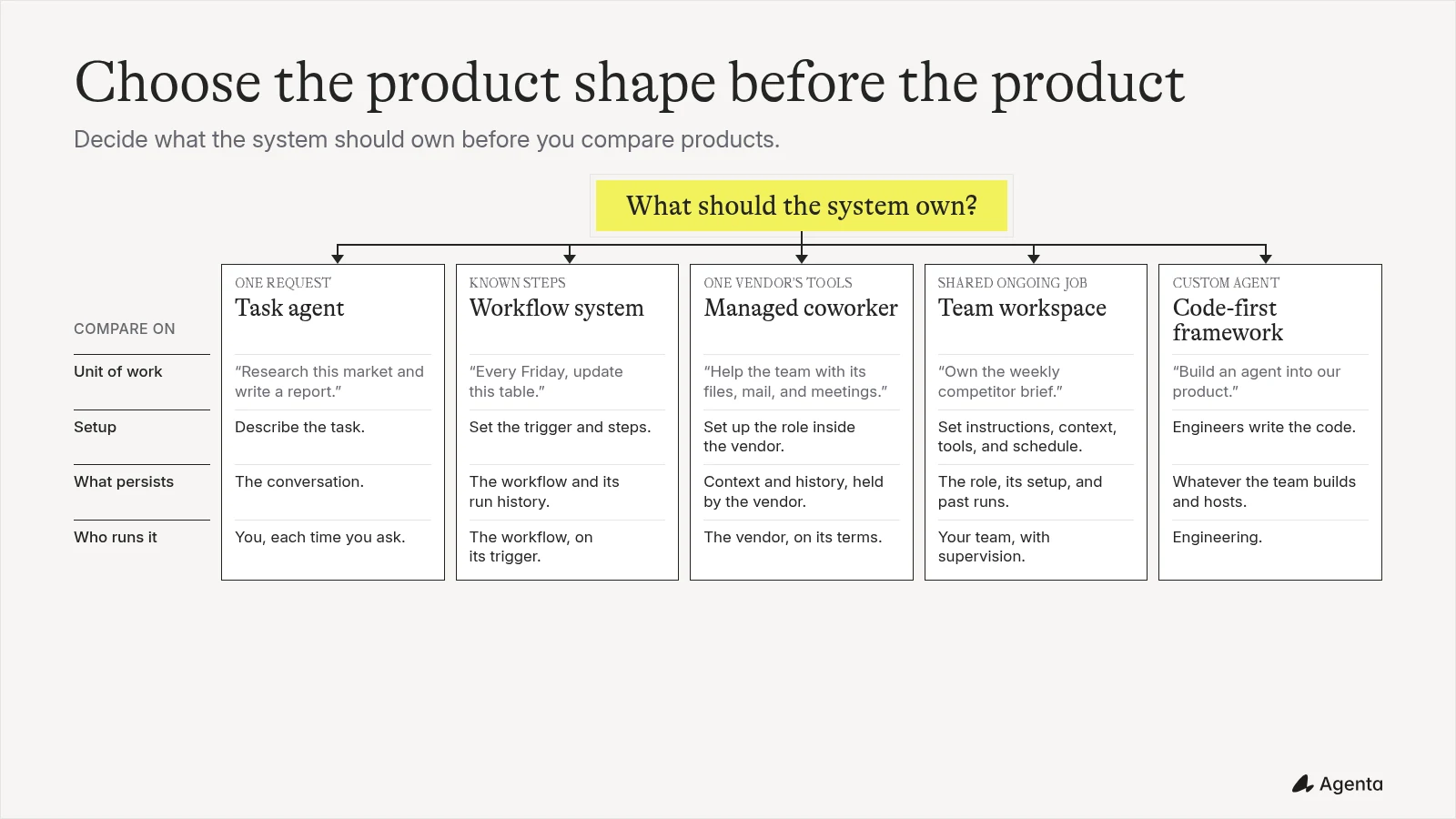
Choose the work shape first: a one-off task, a repeatable workflow, a coworker inside one ecosystem, a configurable team workspace, or a code-first agent system.
How to compare the platforms
Start with what the system can reach. For competitor research, that may include the live web, internal files, a database, Slack, and a publishing tool. Then ask what persists after the first run. A saved chat is useful, but it is different from a versioned role with instructions, skills, tools, permissions, and a schedule.
Team operation adds another layer. Check whether coworkers can be shared, who can edit them, where private and shared conversations live, and which actions require approval. For high-impact work, run history and clear human review matter more than complete autonomy.
Finally, compare the operating model. A managed product can be quick to adopt, while a configurable or self-hosted platform gives the team more control. Pricing may be per seat, per credit, per activity, per workflow execution, or based on model usage. Estimate the cost of the full recurring job, including the model and the people who maintain it.
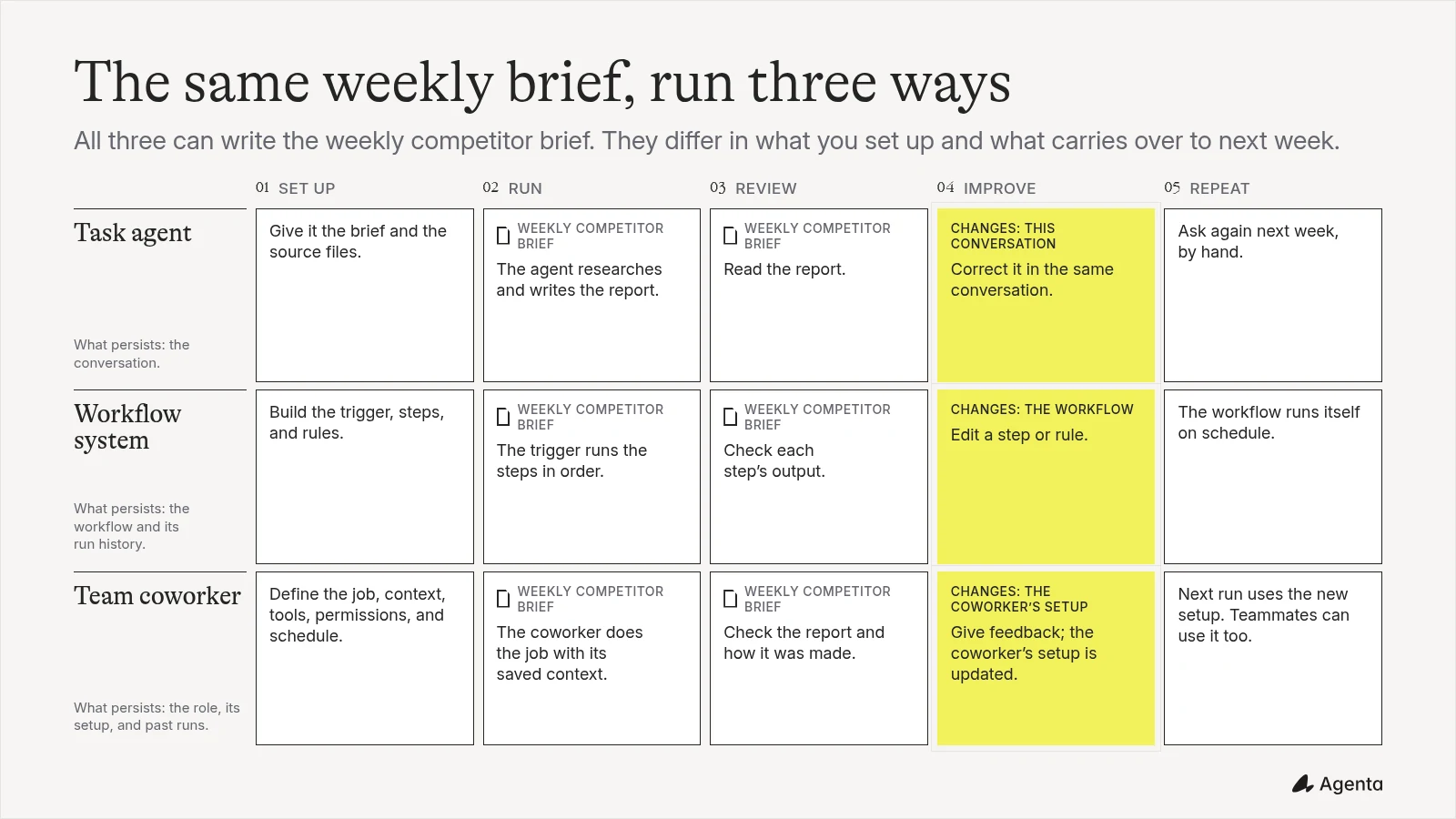
The same report can come from a task agent, workflow, or team coworker. The difference is what the team configures and what the next run reuses.
Agenta: best for configurable AI coworkers a team can share and self-host
Agenta is an open-source workspace for building AI coworkers and automations for professional work. Instead of one general assistant, a team can create several coworkers with distinct jobs, each with its own instructions, files, skills, tools, channels, permissions, and schedules. It is built to stay simple for the person asking for work without hiding the machinery from the person who operates it. A business user can request work, give feedback, and reuse the coworker. A technical teammate can inspect the configuration, connect systems, set permissions, trace runs, and review costs.
For the weekly competitor brief, the team can create a named researcher, connect its sources and publishing tools, define the review step, schedule the run, and share the same coworker with colleagues. Model and payment freedom are central. A team can bring its own model-provider keys, use supported ChatGPT or Claude subscriptions, or connect supported free and lower-cost models when self-hosted. Feedback updates the coworker, and versioning keeps the improved behavior without losing the previous setup.
This flexibility asks more at the start than a fixed assistant. A technical founder or teammate will usually set up the advanced integrations, permissions, and deployment, and the benefits are clearest for ongoing work rather than a single quick task.
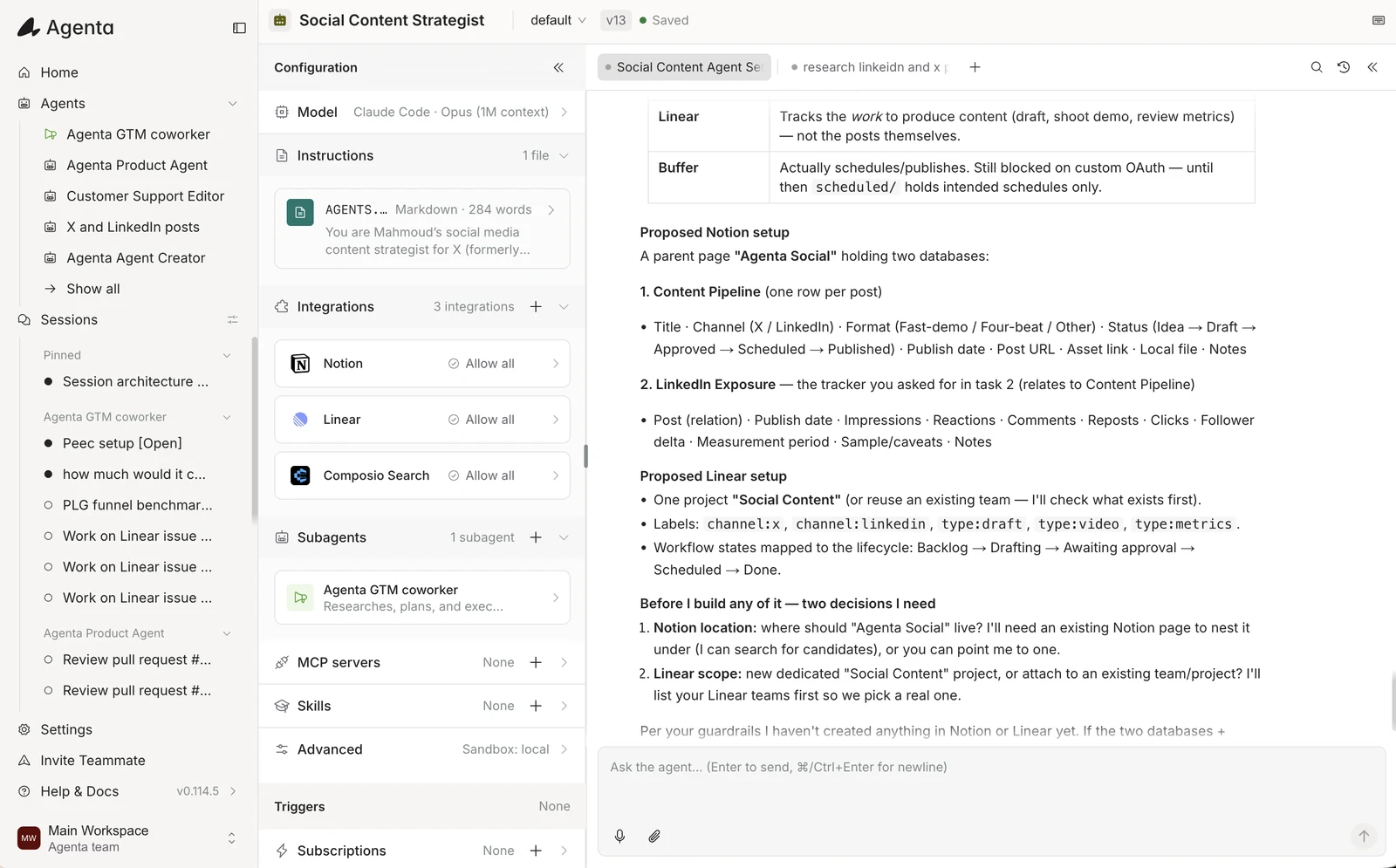
An Agenta coworker in use: its configuration (model, instructions, integrations, subagents, and triggers) sits beside the session where the team works with it.
Useful capabilities
- Several coworkers with distinct jobs, each with its own instructions, shared agent files and session files, skills, tools, channels, permissions, and schedules
- Slack, Telegram, WhatsApp, and embeddable chat widgets (
Publish > Embed) for external websites, dashboards, and internal tools - Private and shared conversations for team use
- Feedback-driven improvement with visible, versioned configuration
- Bring-your-own-key plus supported ChatGPT and Claude subscription access when self-hosted locally for personal use
- Model choice, gateways, self-hosted models, tracing, token use, and estimated cost
- Cloud and self-hosted deployment
- Scheduled runs and application events
- Open-source, MIT-licensed platform with portable agent components
Pricing: Agenta Cloud has a free plan with $10 in included credits and up to 3 team members. Starter costs $29 per month with $30 in included credits and unlimited team members, schedules, and events. Plus costs $99 per month with $110 in included credits and unlimited team members. The self-hosted edition is free to run and MIT licensed, with infrastructure and model costs paid separately.
Pros: Several coworkers for different business jobs, feedback-driven improvement with visible and versioned configuration, and strong control over models, deployment, and cost.
Cons: More initial configuration than a fixed assistant. Advanced integrations and self-hosting need a technical owner, and the benefits are clearest for ongoing work.
Verdict: Choose Agenta when the goal is to build coworkers that become part of how a team operates, with a conversational experience for business users and enough depth for engineers to configure, govern, and improve. Claude Cowork or ChatGPT Work will be faster for an individual who mainly needs polished one-off work.
Claude Cowork: best for document-heavy knowledge work
Claude Cowork is designed for longer projects that involve documents, files, browser research, and connected applications. Its simple task interface works well when the starting material is a large body of information and the desired result is a report, analysis, artifact, or reorganized set of files.
Cowork can run locally through the desktop application or in cloud sessions. Cloud tasks can continue while a laptop is closed, and scheduled work can repeat. Projects, instructions, skills, and connectors provide reusable context around the task. Team and Enterprise plans add organization controls and managed permissions.
For a weekly competitor brief, Claude is a strong choice when the work centers on reading source material, comparing documents, and producing clear writing. It remains tied to Anthropic’s models and hosted product. Heavy Cowork use can also consume plan capacity faster than ordinary chat.
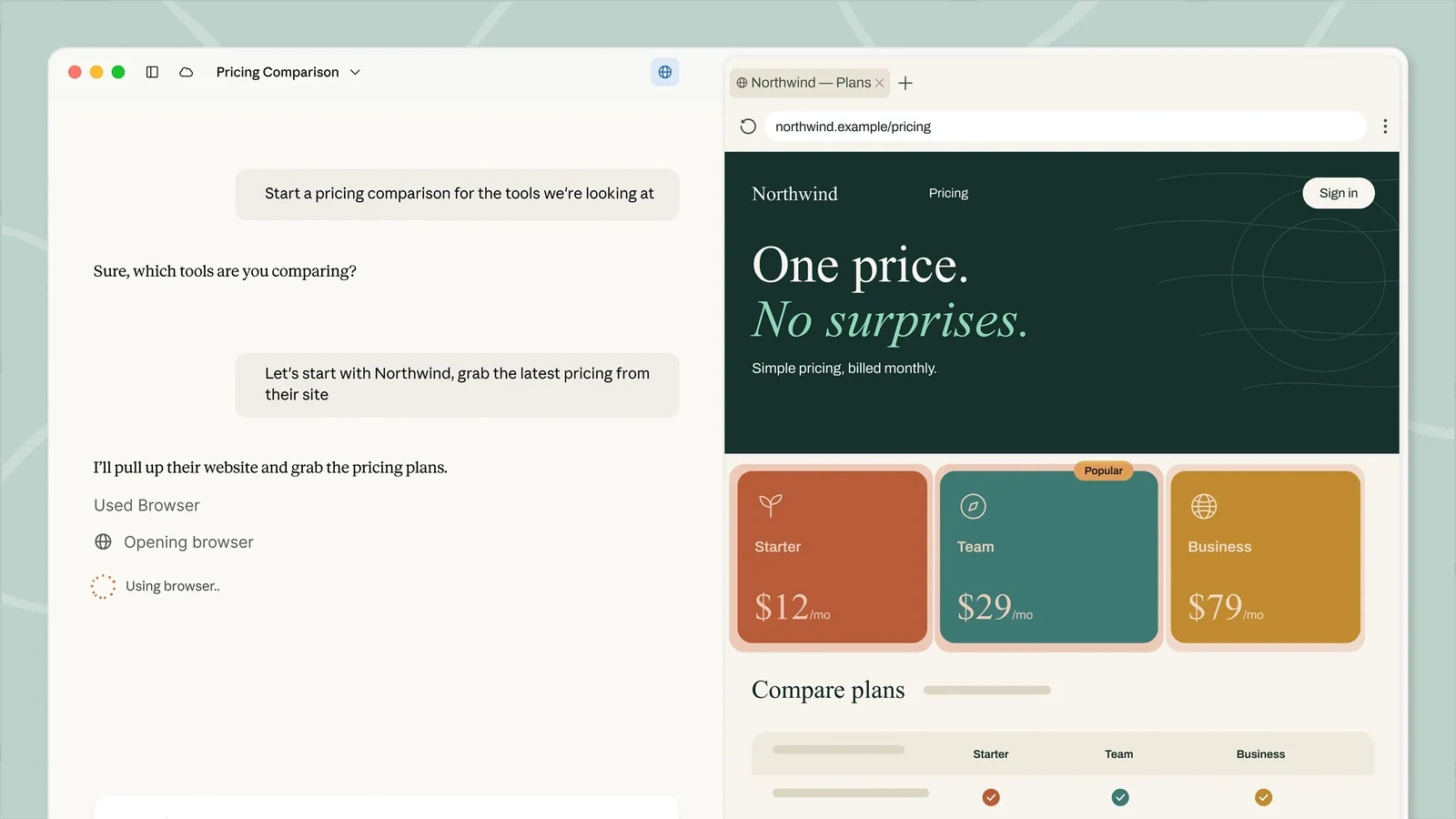
Claude Cowork using its in-app browser during a product comparison.
Useful capabilities
- Strong document analysis, writing, and file creation
- Local and cloud Cowork sessions
- Browser access, connectors, skills, and project context
- Scheduled cloud tasks
- Administrative controls on Team and Enterprise plans
Pricing: Cowork is included with eligible Claude paid plans. Pro costs $20 per month, or $17 per month with annual payment. Max costs $100 or $200 per month. Team starts at $20 per seat per month, with plan and minimum-seat conditions.
Pros: Focused interface, strong file handling, and high-quality work with long source material.
Cons: Anthropic models only, no self-hosted product, and agent work can use plan limits quickly.
Verdict: Choose Claude Cowork when the job begins with documents and ends with a thoughtful deliverable. It is especially attractive to teams already committed to Claude.
ChatGPT Work: best for broad multi-step tasks
ChatGPT Work extends ChatGPT from conversation into longer work. It can research, use connected context, and create documents, spreadsheets, presentations, reports, websites, and other finished artifacts. The surrounding ChatGPT product also includes projects, applications, and Codex for software work.
OpenAI’s Workspace Agents add the reusable layer. Teams can create agents with instructions, files, skills, applications, tools, and schedules, then share published versions with chat, edit, or owner access. API triggers can start a run from another system. This makes the combined product broader than the Work task surface alone.
For competitor research, ChatGPT Work fits a changing assignment where the desired output matters more than a fixed sequence. Workspace Agents make it possible to save the role and repeat it. The model and deployment choices remain inside OpenAI’s environment, and some trigger workflows still have limited result retrieval through the API.
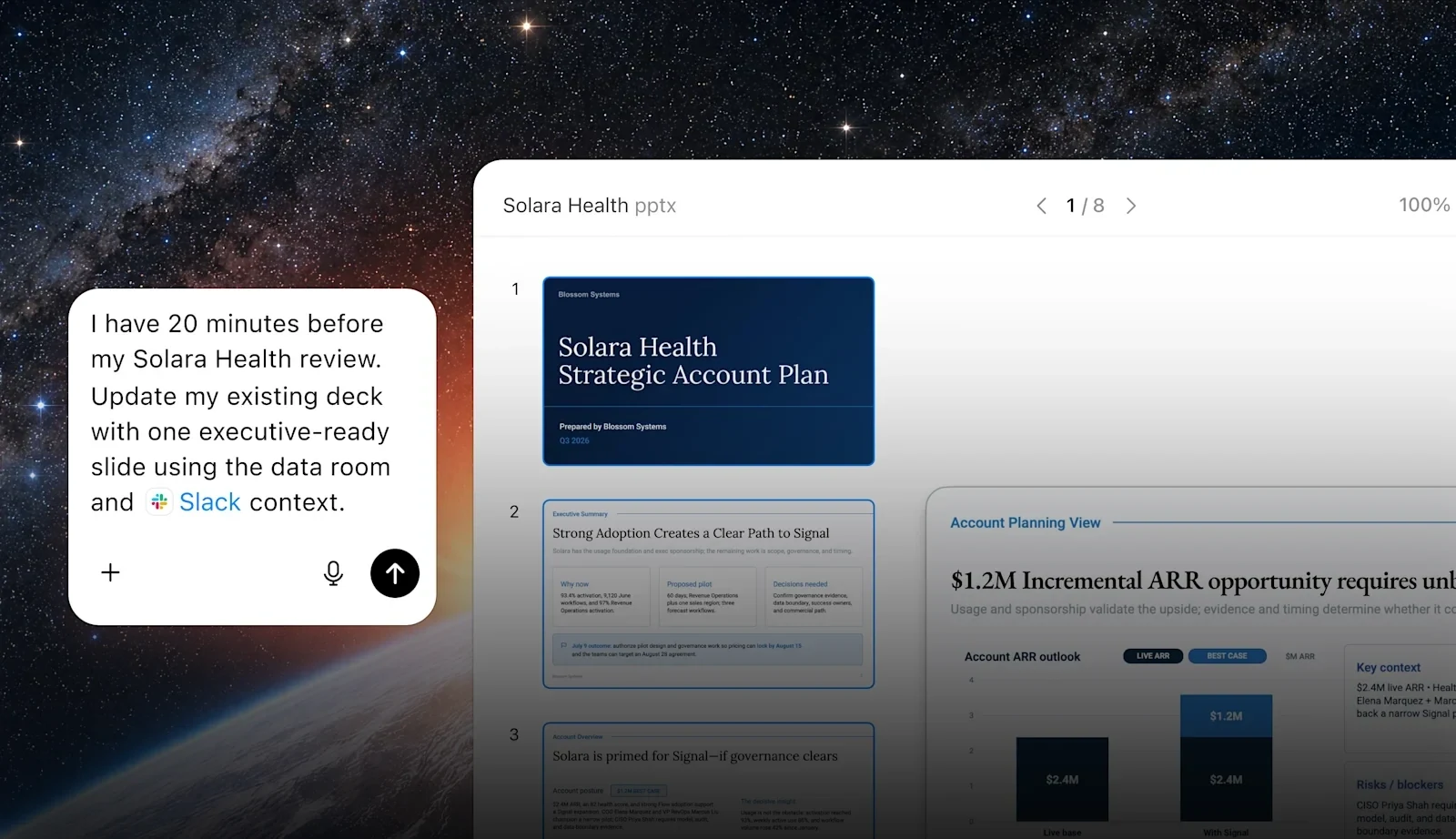
ChatGPT Work updating a presentation from connected business context.
Useful capabilities
- Broad research, analysis, coding, and artifact creation
- Workspace Agents with reusable instructions, files, skills, and tools
- Schedules, application connections, and API triggers
- Published versions and team sharing controls
- Access from web, mobile, and supported desktop applications
Pricing: Work and Workspace Agents are included with eligible ChatGPT plans. ChatGPT Business Standard starts at $20 per user per month when billed annually or $25 monthly. Business Premium starts at $100 per user per month annually. Enterprise pricing is custom.
Pros: Broad output formats, familiar interface, strong general capability, and a direct path from one-off work to reusable workspace agents.
Cons: OpenAI models and hosting only. Costs depend on the selected plan and usage limits.
Verdict: Choose ChatGPT Work when a team wants one polished environment for many kinds of knowledge and software work. Choose a workflow product when the steps need to be explicit and predictable.
Microsoft 365 Copilot Cowork: best for work inside Microsoft 365
Microsoft 365 Copilot Cowork carries out multi-step tasks across Microsoft 365. It can work with Outlook, Teams, calendars, OneDrive, SharePoint, Word, and other Microsoft services, subject to the user’s permissions and the organization’s controls.
Its main advantage is context. A company that already keeps email, meetings, files, and collaboration in Microsoft 365 can let Cowork act without assembling a separate set of connections. It asks for confirmation before consequential actions such as sending an email or scheduling a meeting. Administrators can control models, plugins, browser access, and usage-based billing.
For the competitor brief, Cowork can collect internal context, create a document, share it, post an update in Teams, and schedule a review. It does not work with arbitrary local files in the same way as a desktop agent. OneDrive and SharePoint are the supported file layer, and encrypted or oversized files can limit access.
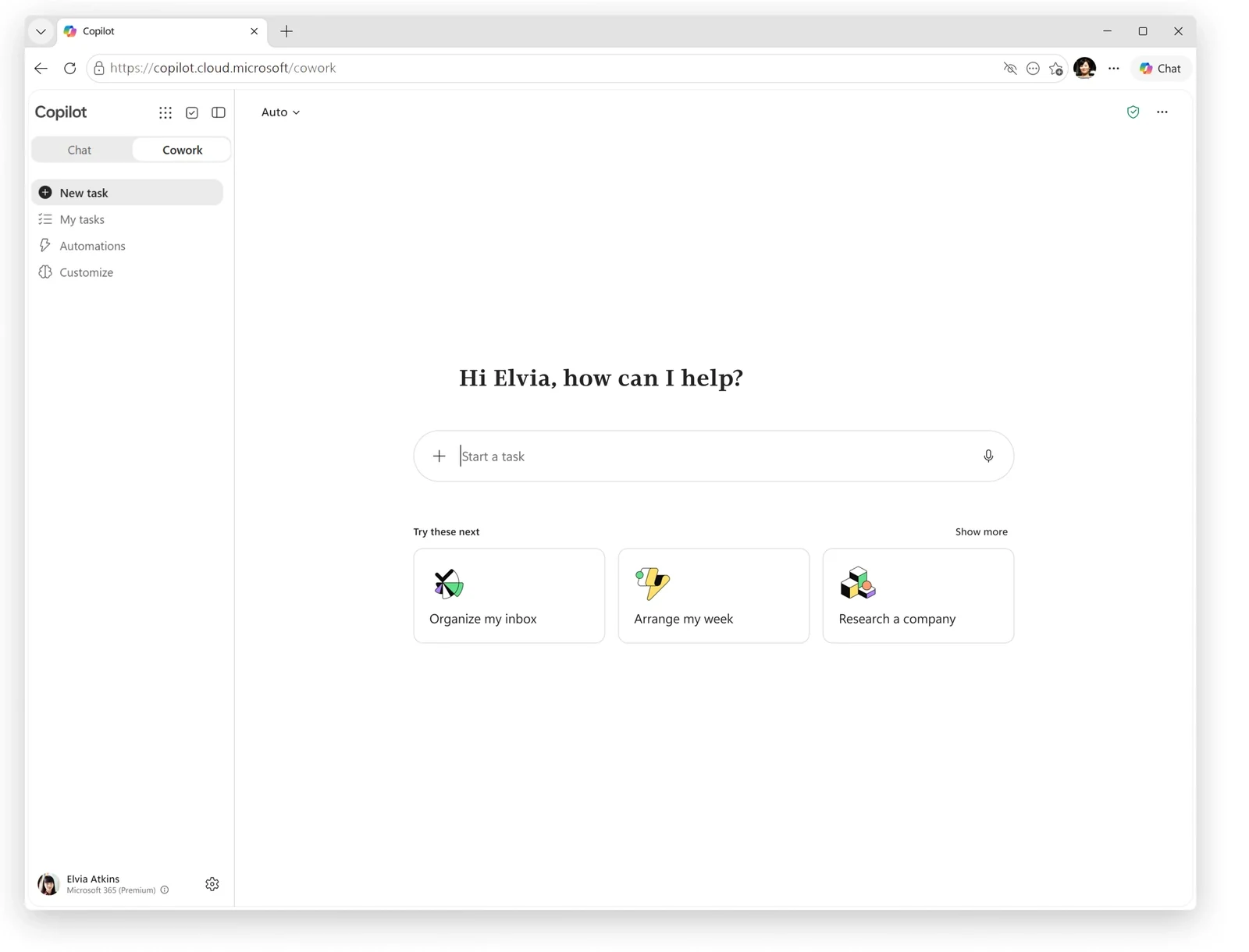
Microsoft 365 Copilot Cowork offers task suggestions inside the Microsoft work environment.
Useful capabilities
- Email, meetings, calendar, documents, and Teams actions
- Microsoft 365 identity and permission inheritance
- Approval before external actions
- Browser access, plugins, and up to 50 custom skills
- Central administrative and spending controls
Pricing: Cowork requires an eligible Microsoft 365 Copilot plan and usage-based billing enabled by an administrator. Microsoft 365 Copilot Business starts at $21 per user per month annually for eligible organizations. Exact Cowork cost depends on use.
Pros: Deep Microsoft context, familiar administrative controls, and a practical route from research to email, documents, meetings, and Teams.
Cons: Best value depends on a Microsoft 365 commitment. It has no self-hosted option and does not use arbitrary local files.
Verdict: Choose Microsoft 365 Copilot Cowork when Microsoft 365 already holds the company’s working context. A separate platform will make more sense for teams with a mixed application stack.
Dust: best for agents grounded in company knowledge
Dust is an enterprise agent workspace built around company knowledge. Teams can create shared agents, connect internal sources, control access through spaces, and bring the agent into tools such as Slack. Dust supports more than 70 data connections and a selection of models from several providers.
For competitor research, Dust is useful when the brief needs both public market information and private context from company documents, databases, support conversations, and product work. The team can create specialized agents, place knowledge in controlled spaces, and run workflows on schedules or triggers.
Dust offers broad model selection inside its managed product, but it is not a self-hosted workspace. Entry plans also limit how much connected company context a team can organize, so a serious deployment may require a higher tier.
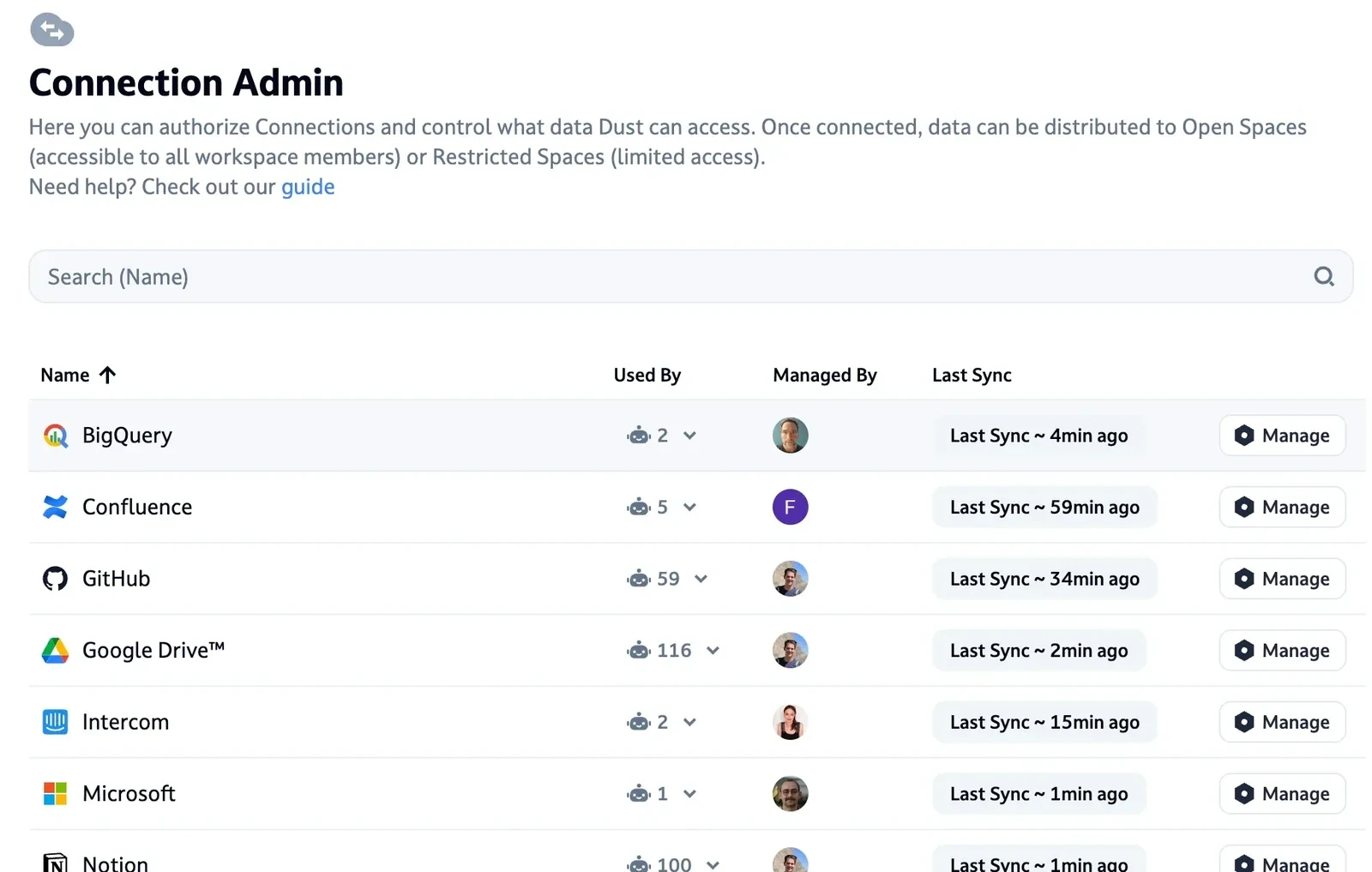
Dust Connection Admin with a company data source, shown in a February 2025 product update.
Useful capabilities
- Shared agents grounded in company knowledge
- More than 70 data connections and support for MCP tools
- Selection from more than 20 managed models
- Spaces, permissions, audit controls, and human review
- Scheduled and event-triggered workflows
Pricing: Dust pricing includes a free tier with 500 lifetime credits. Pro costs €24 per seat per month when billed annually or €30 monthly. Max costs €120 per seat per month annually or €150 monthly. Enterprise pricing is custom.
Pros: Strong knowledge connections, team controls, and model selection in a managed workspace.
Cons: No self-hosted edition. Useful company-wide deployments can require higher-priced seats and enterprise controls.
Verdict: Choose Dust when governed company knowledge is the center of the job. It is less compelling when the main need is a lightweight personal task agent or complete infrastructure control.
Relevance AI: best for visual multi-agent workforces
Relevance AI lets teams create agents, tools, and multi-agent workforces in a visual environment. A workforce divides a larger outcome among specialized agents, which makes the product useful when one job needs several roles and handoffs.
For a competitor brief, one agent could collect changes, another could analyze positioning, and another could assemble the report. The system supports schedules, application events, APIs, webhooks, and software development kits. Approval levels let a team decide when an agent acts independently and when it should stop for a person.
The visual builder reduces the amount of code required, but a multi-agent system still needs careful design and testing. Relevance AI uses a dual-meter billing model where every tool step or agent run consumes Actions alongside Vendor Credits (unless using BYOK), and its entry Pro tier caps builder seats and projects before requiring a jump to Team pricing.
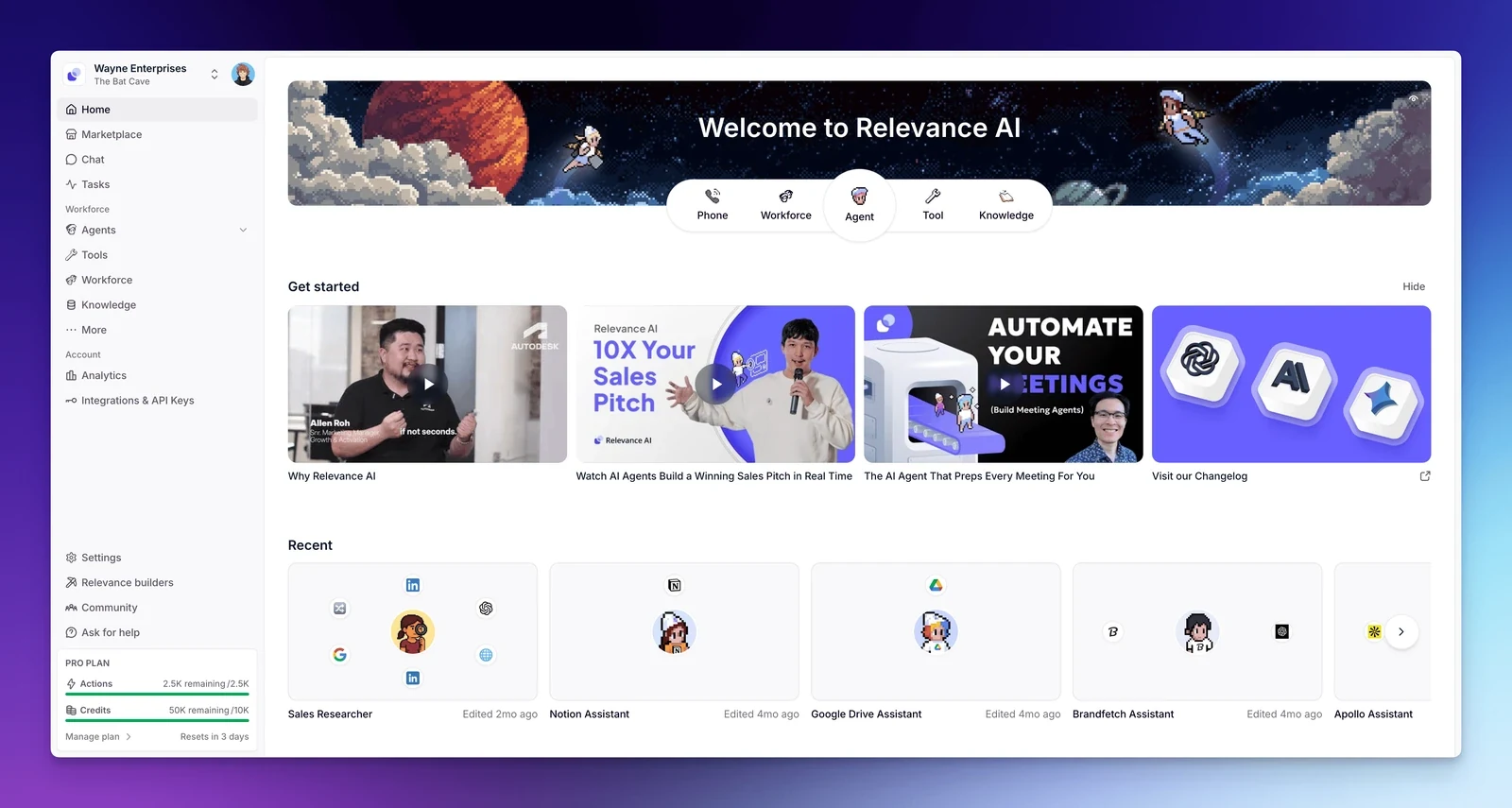
The Relevance AI dashboard provides access to agents, tools, and workforce components.
Useful capabilities
- Visual agents, tools, and multi-agent workforces
- Schedules, application triggers, APIs, webhooks, and SDK access
- More than 2,000 application integrations through its integration layer
- Bring-your-own provider keys for supported model providers
- Approval levels, evaluations, SSO, RBAC, and audit controls
Pricing: Relevance AI pricing includes a 14-day trial (the permanent free plan was retired in October 2025). Pro costs $19 per month billed annually ($29 monthly) with 7,000 Actions per month, 2 Build Users, and 1 project. Team costs $234 per month billed annually ($349 monthly) with 7,000 Actions per month, 5 Build Users, 45 End Users, and 5 projects. Top-up Actions cost $80 per 1,000 Actions, and Enterprise plans are priced by quote.
Pros: Clear visual model for complex agent teams, broad integrations, and several ways to trigger work.
Cons: Dual usage meters (Actions plus Vendor Credits), a steep jump from Pro ($19/month annual for 2 Build Users and 1 project) to Team ($234/month annual), and no self-hosted edition.
Verdict: Choose Relevance AI when the work naturally divides into several specialist agents and the team wants to design those handoffs visually. (Compare it with other options in our guide to the best Relevance AI alternatives.)
Lindy: best for managed business routines
Lindy presents agents as managed AI employees for recurring business work. Teams can start from templates, give a Lindy persistent workspace context, connect applications, and define routines in a visual editor. It supports Slack, browser and computer use, skills, schedules, and human approval.
For competitor research, a Lindy can collect updates on a routine, prepare the brief, and send it to Slack for review. Its ready-made patterns are useful for operations, sales, support, recruiting, and administrative work where the team wants a managed service with limited infrastructure work.
Lindy prices work through monthly credits. Simple routines may be inexpensive, while browser-heavy research and large builds can consume many more credits. Direct signups do not receive the same general free trial offered through some teammate invitations.
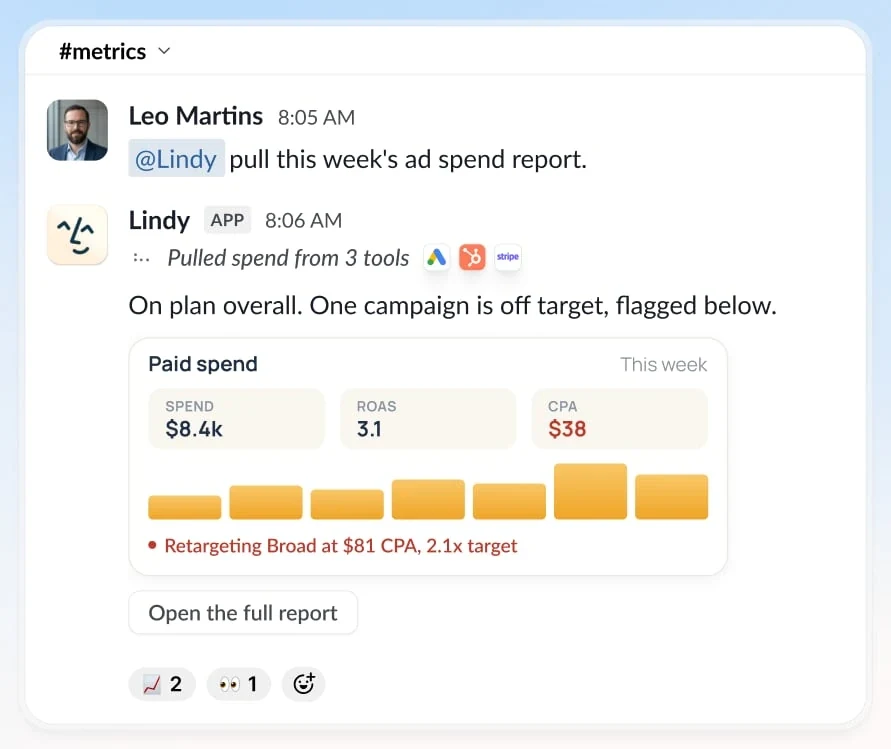
A Lindy prepares a recurring weekly report and delivers it through Slack.
Useful capabilities
- Templates and visual routines for common business work
- Persistent workspace context and team files
- Schedules, Slack delivery, browser use, and computer use
- Thousands of application integrations and MCP support
- Model selection, version history, and approvals
Pricing: Lindy Plus costs $29.99 per user per month with 3,000 credits. Pro costs $99.99 with 15,000 credits. Max costs $199.99 with 35,000 credits. Usage needs depend heavily on the job.
Pros: Quick managed setup, useful templates, and strong channels for everyday business work.
Cons: No self-hosting. Credit use can be difficult to predict for long research or computer-use jobs.
Verdict: Choose Lindy when the team wants a ready-made assistant and visual routines without operating the underlying infrastructure.
Zapier Agents: best for automation across business apps
Zapier Agents brings agent decisions into Zapier’s large application ecosystem. An agent can use connected apps, knowledge sources, website access, and search tools to perform work that is less rigid than a traditional Zap. Activity history shows what agents completed and what needs attention.
Zapier is moving the standalone Agents experience into AI by Zapier, where agentic steps sit inside broader workflows. That direction suits teams that already use Zapier and want AI to choose tools, browse the web, or pause for approval inside an automation.
For competitor research, Zapier can collect inputs from many systems, call an AI step, and route the result to a document, database, or channel. Its strength is orchestration across applications. Persistent learning is more limited: AI by Zapier knowledge resets between runs unless the workflow saves and reloads the relevant state.
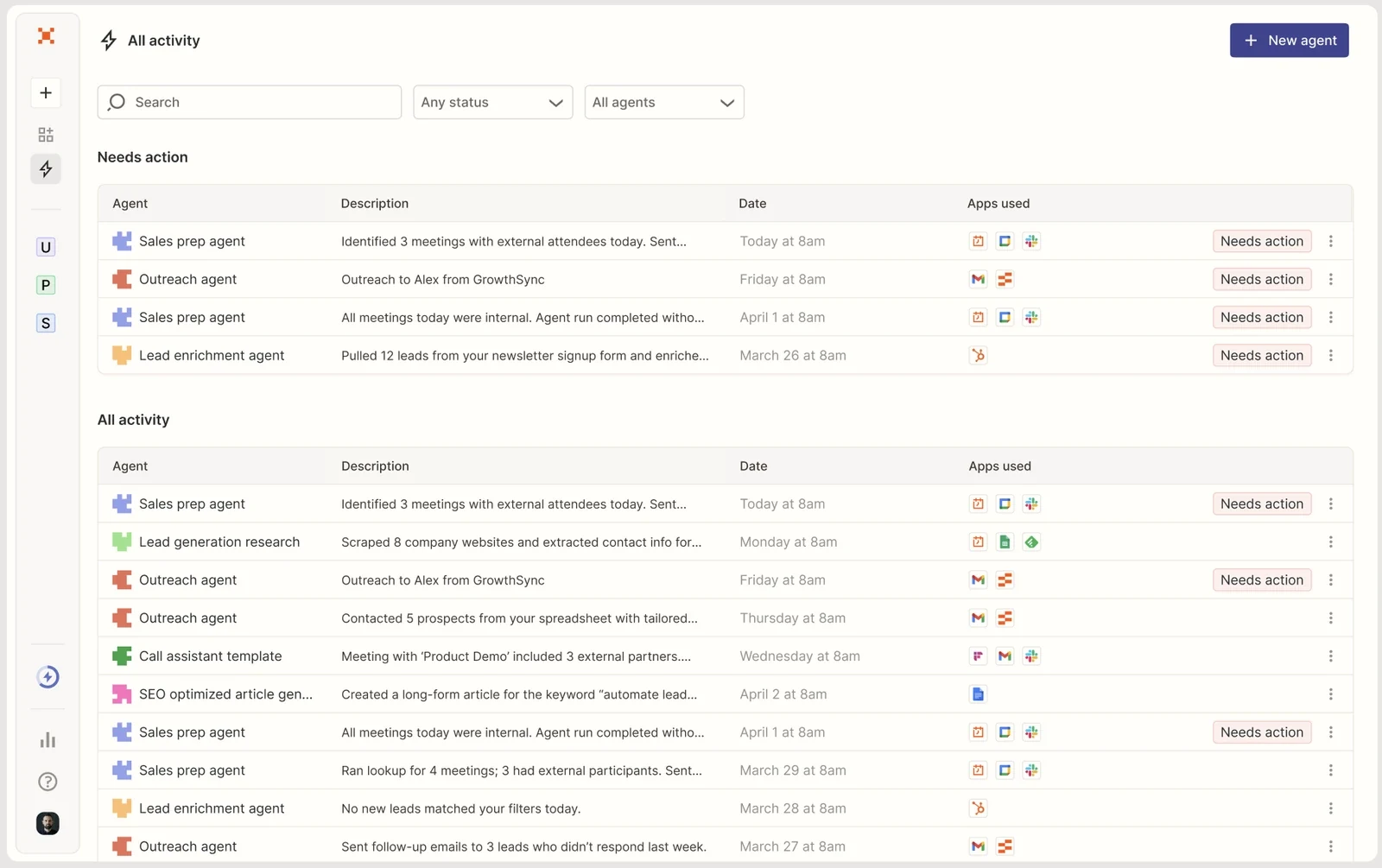
The Zapier Agents dashboard separates completed work from items that need attention.
Useful capabilities
- Large library of connected business applications
- App and file knowledge sources
- Website browsing and search tools
- Agent steps inside explicit Zapier workflows
- Human approval and activity history
Pricing: Zapier pricing lists 400 monthly activities on the free Agents tier. Agents Pro starts at $33.33 per month when billed annually and includes 1,500 activities. Agent sharing is an Enterprise feature. Packaging may change as Agents moves into AI by Zapier.
Pros: Excellent application coverage and a natural fit for teams already running Zapier automations.
Cons: Product packaging is in transition. Persistent coworker context and sharing are more limited than in a dedicated team workspace.
Verdict: Choose Zapier when connected application actions are the main requirement. Choose a coworker workspace when the role, memory, and team improvement process matter more than the automation graph.
n8n: best for explicit workflows with AI steps
n8n is a visual workflow automation platform with code steps, AI nodes, triggers, branches, and extensive integrations. It gives technical operators a clear graph of how data moves and what happens at each step. Cloud and self-hosted deployment options make it attractive to teams that need infrastructure choice.
For a weekly competitor brief, n8n can run on Friday, gather defined sources, call models, apply rules, request approval, and publish the result. The process is visible and reproducible. When the research method changes, the operator edits nodes, mappings, prompts, or code.
n8n can power agentic work, but its center of gravity remains the workflow. Open-ended coworker behavior may require a large graph and explicit state management. The Community Edition is source-available under n8n’s Sustainable Use License rather than an Open Source Initiative license.
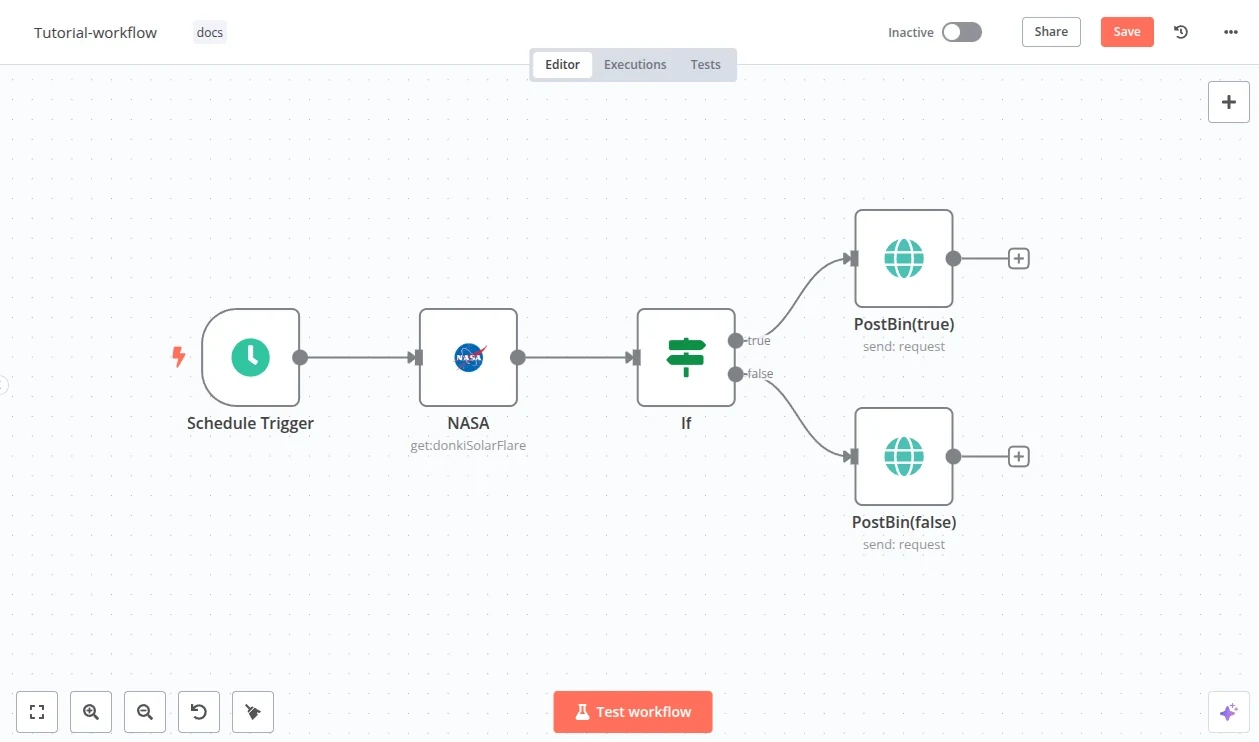
An n8n workflow uses a schedule, request, condition, and two output branches.
Useful capabilities
- Visual triggers, branches, loops, data mapping, and AI nodes
- JavaScript, Python, APIs, and command-line tools for custom logic
- Cloud and self-hosted deployment
- Human approval patterns and execution history
- Shared projects, environments, Git version control, SSO, and governance on higher plans
Pricing: n8n pricing starts with a free self-hosted Community Edition. Cloud Starter costs €20 per month annually for 2,500 executions. Pro costs €50 for 10,000 executions. The self-hosted Business plan starts at €667 per month annually, and Enterprise pricing is custom.
Pros: Explicit control, strong integration and code options, predictable workflow structure, and self-hosting.
Cons: Complex workflows require technical maintenance. Advanced team controls are expensive, and the Community Edition has commercial-use restrictions.
Verdict: Choose n8n when the process can be expressed as a visible workflow and must run consistently. Choose a coworker platform when people should improve an ongoing role through conversation rather than editing a graph.
How to choose and deploy AI coworkers
Choose the product shape before the product
Write down the responsibility before comparing feature lists. “Own the weekly competitor brief” is clearer than “help with research.” Define the inputs, expected output, review owner, delivery channel, and conditions that should stop the run.
Then choose the product shape. Use a task agent when assignments change and a person starts each one. Use a workflow system when the sequence is known. Use a managed coworker when the work lives inside one vendor ecosystem. Use a configurable workspace when the team needs several durable roles, shared control, and model or deployment choice.
For adjacent examples, compare the product shapes in the best Manus alternatives, best Grok Bot alternatives, open-source Claude Cowork alternatives, best ChatGPT Business alternatives, and best AI agent orchestration platforms guides.
Compare access, persistence, and team control
List every resource the coworker needs. Include the web, files, databases, communications, local computer access, and external services. Check what the platform can read, what it can change, and how credentials are scoped.
Next, inspect what persists. Useful persistence can include the role, instructions, files, skills, tools, permissions, schedule, feedback, run history, and versions. A platform does not need every type of persistence, but it should preserve the parts that make the next run better and safer.
For team use, decide who can run the coworker, edit its setup, see its history, approve actions, and own failures. A shared agent without clear ownership becomes another undocumented automation.
Compare the full cost of a recurring job
Convert each pricing model into the same unit. For the weekly brief, estimate four runs per month, typical source volume, model use, application actions, reviewers, and editors. Include paid seats, credits, activities, workflow executions, model tokens, and infrastructure.
A free tier can prove the first run, but it may not prove team operation. Check whether schedules, sharing, connected knowledge, audit history, approval, and retention sit on higher plans. Self-hosting removes some vendor charges but adds infrastructure, upgrades, backups, and operational ownership.
Start with one bounded responsibility
Begin with one useful job that a person already understands. Run it interactively before adding a schedule. Review the source use, claims, actions, output format, cost, and failure modes. Save only the corrections that should apply to future runs.
Once the result is reliable enough, add recurrence and team access. Keep a named owner and an approval step for consequential actions. Review the system again whenever its models, tools, permissions, or business process change.
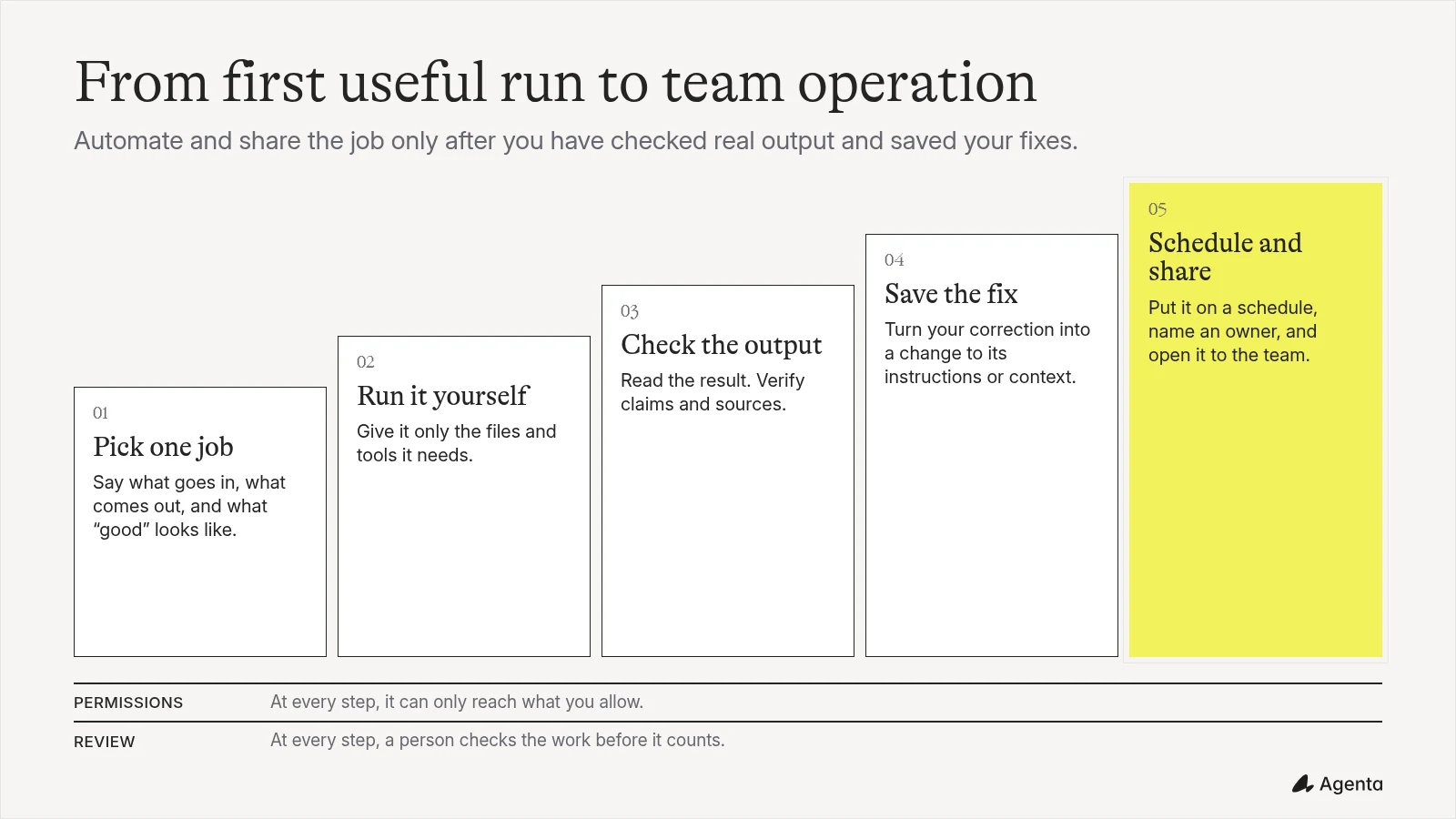
Move from one bounded job to recurring team operation after people can review the output and preserve useful corrections.
Which AI coworker platform should you choose?
- Choose Claude Cowork for document-heavy research and file work in the Anthropic ecosystem.
- Choose ChatGPT Work for broad tasks, many output formats, and a familiar OpenAI workspace.
- Choose Microsoft 365 Copilot Cowork when email, meetings, files, and collaboration already live in Microsoft 365.
- Choose Dust when governed company knowledge should ground shared agents.
- Choose Relevance AI when the job benefits from several visual agents with explicit handoffs.
- Choose Lindy for a managed business assistant with routines, channels, and templates.
- Choose Zapier when connected application actions are the center of the job.
- Choose n8n when the process needs an explicit workflow, technical control, and optional self-hosting.
- Choose Agenta when the team wants configurable coworkers it can share, version, inspect, and run with its chosen models or infrastructure.
Frequently asked questions
What is the difference between an AI agent and an AI coworker?
An AI agent can complete a task or take actions toward a goal. An AI coworker is an agent configured around an ongoing responsibility, with reusable context, tools, boundaries, review, and a way to improve future work.
Can an AI coworker run on a schedule?
Yes. Agenta, Claude Cowork, ChatGPT Workspace Agents, Dust, Relevance AI, Lindy, Zapier, and n8n support scheduled work in some form. Microsoft 365 Copilot Cowork can also carry out recurring work within its governed environment. Availability and limits depend on the plan.
Which AI coworker platforms can be self-hosted?
Agenta and n8n can be self-hosted. Agenta provides an open-source coworker workspace. n8n provides a source-available Community Edition focused on workflows. The other products in this guide are managed services, although some offer enterprise deployment controls.
Which platform gives the most model choice?
Agenta gives the operator direct choice among supported model providers, gateways, self-hosted models, and supported subscriptions when self-hosted. Dust and Lindy offer model selection inside their managed products. Relevance AI supports provider keys. ChatGPT Work, Claude Cowork, and Microsoft 365 Copilot Cowork stay within their vendor ecosystems.
Which platform is easiest for a small team to start with?
ChatGPT Work and Claude Cowork are straightforward when the team already pays for those products. Lindy offers templates for common business routines. Zapier is approachable for teams that already use Zaps. Agenta and n8n require more setup but provide more control over the coworker or workflow.
How should a team test an AI coworker platform?
Run the same real job in each candidate product with the same inputs and acceptance criteria. Compare the finished result, supervision, setup time, access controls, repeatability, team sharing, and full cost. Then repeat the job after one correction to see what the next run actually reuses.
Try it on your own weekly brief
Give your team its first AI coworker
Start with one recurring job. Give the coworker the tools and context it needs, review its first result, and save your corrections for the next run.
Free cloud tier. Open source and self-hostable.