Jinja2 Template Support in the Playground
You can now use Jinja2 templates in your prompts. Jinja2 is available in both the Playground and in prompt management.
Learn more in our blog post or check the documentation.
New features, improvements, and fixes in Agenta.
You can now use Jinja2 templates in your prompts. Jinja2 is available in both the Playground and in prompt management.
Learn more in our blog post or check the documentation.
We're open sourcing the core of Agenta under the MIT license. All functional features are now available to the community. This includes the evaluation system, prompt playground and management, observability, and all core workflows.
Development moves back to the public repository. We're building in public again. Only enterprise collaboration features like SSO and audit logs remain under a separate license.
Get started with the self-hosting guide. View the code and contribute on GitHub. Read why we made this decision at agenta.ai/blog/commercial-open-source-is-hard-our-journey.
You can now run programmatic evaluations of complex AI agents and workflows directly from code. The Evaluation SDK gives you full control over test data and evaluation logic. It works with agents built using any framework.
The SDK lets you create test sets in code or fetch them from Agenta. You can use built-in evaluators like LLM-as-a-Judge, semantic similarity, or regex matching. You can also write custom Python evaluators. The SDK evaluates end-to-end workflows or specific spans in execution traces. Evaluations run on your own infrastructure; results display in the Agenta dashboard.
Check out the Evaluation SDK documentation to get started.
You can now automatically evaluate every request to your LLM application in production. Online Evaluation helps you catch hallucinations and off-brand responses as they happen. You no longer need to discover problems through user complaints.
You can configure evaluators like LLM-as-a-Judge with custom prompts. Set sampling rates to control costs. Create evaluations with filters for specific spans in your traces. All evaluated requests appear in one dashboard. You can filter traces by evaluation scores to understand issues. You can also add problematic cases to test sets for continuous improvement.
Setting up online evaluation takes just a couple of minutes. It provides immediate visibility into production quality.
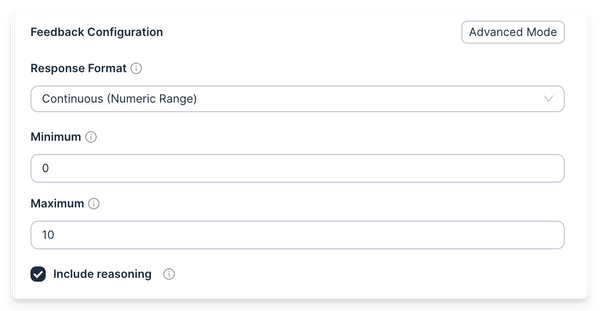
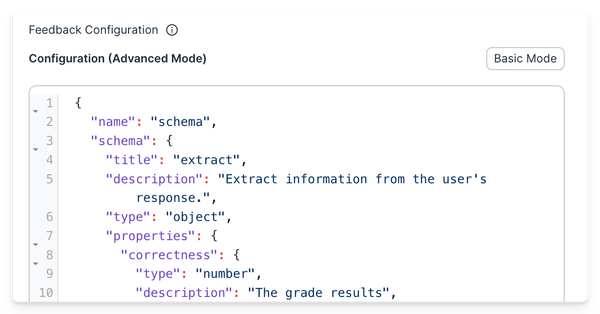
The LLM-as-a-Judge evaluator now supports custom output schemas. Create multiple feedback outputs per evaluator with any structure you need.
You can configure output types (binary, multiclass), include reasoning to improve prediction quality, or provide a raw JSON schema with any structure you define. Use these custom schemas in your evaluations to capture exactly the feedback you need.
Learn more in the LLM-as-a-Judge documentation.

We've completely rewritten and restructured our documentation with a new architecture. This is one of the largest updates we've made, involving a near-complete rewrite of existing content.
Key improvements include:
We've added support for Google Cloud's Vertex AI platform. You can now use Gemini models and other Vertex AI partner models in the playground, configure them in the Model Hub, and access them through the Gateway using InVoke endpoints.
Check out the documentation for configuring Vertex AI models.
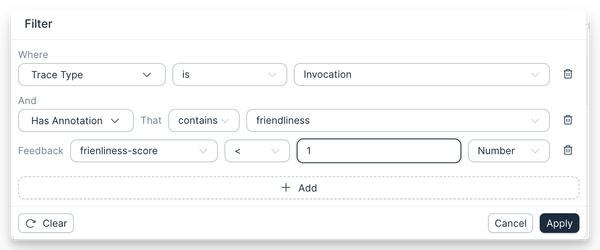
You can now filter and search traces based on their annotations. This helps you find traces with low scores or bad feedback quickly.
We rebuilt the filtering system in observability with a simpler dropdown and more options. You can now filter by span status, input keys, app or environment references, and any key within your span.
The new annotation filtering lets you find:
success=TrueThis enables powerful workflows: capture user feedback from your app, filter to find traces with bad feedback, add them to test sets, and improve your prompts based on real user data.
We've completely redesigned the evaluation results dashboard. You can analyse your evaluation results more easily and understand performance across different metrics.
Here's what's new:
URLs across Agenta now include workspace context, making them fully shareable between team members. Previously, URLs would always point to the default workspace, causing issues when refreshing pages or sharing links.
Now you can deep link to almost anything in the platform - prompts, evaluations, and more - in any workspace. Share links directly with team members and they'll see exactly what you intended, regardless of their default workspace settings.